
🔥 Recommended Success Reports

Aftersale Tool Box V4 Latest Version Download
WriteIMEI Fix & Flash File Server for Infinix, Tecno & iTel — Full Activation Guide
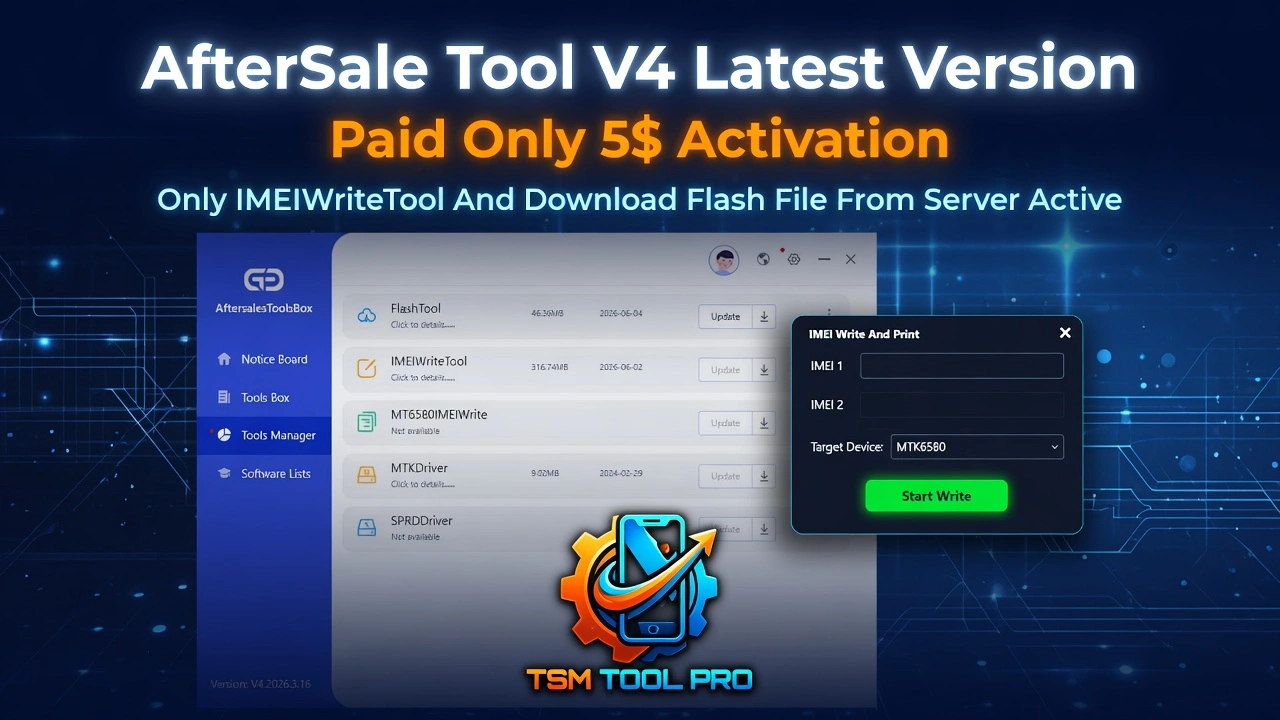
🚀 What Is Aftersale Tool Box V4?
If you work with Infinix, Tecno, or iTel devices and you’re constantly running into IMEI issues or scrambling to find the right firmware, Aftersale Tool Box V4 is the solution you’ve been sleeping on. This tool packs two powerful modules into one clean interface — and for just $5 activation, it’s one of the most affordable unlocks in the game right now.
We’ve been offering this tool for a while and our users absolutely swear by it. Whether you’re a repair shop technician or a solo tech enthusiast, this guide is going to walk you through exactly what you get, how to use it, and how to get activated fast.
Quick heads up: The $5 activation unlocks only the WriteIMEITool and the Flash File Download Server. That’s the scope — no hidden upsells, no confusion.
Let’s break down what each module does and why it matters for your workflow.
🧰 What’s Inside the $5 Activation
Here’s a quick rundown of everything bundled into the Aftersale Tool Box V4 activation at this price tier:
-
WriteIMEI Tool — Fix IMEI on Infinix, Tecno & iTel -
Flash File Download Server — All firmware versions -
MTK (MediaTek) CPU Support — Auto Meta Mode boot -
SPD (Spreadtrum) CPU Support — Auto Diag Mode boot -
All Security Patches Supported — No version restrictions -
Auto Password Paste for Firmware Downloads
That’s a solid lineup for five bucks. Now let’s get into the actual how-to so you can start using these features like a pro.
📶 How to Fix IMEI Using WriteIMEITool
IMEI problems are some of the most common issues techs deal with on Infinix, Tecno, and iTel phones — whether it’s a factory reset gone wrong or a device stuck showing “baseband unknown.” Aftersale Tool Box V4’s WriteIMEITool handles this cleanly, and it supports every patch and every security level. Here’s the step-by-step:
Pro tip: Don’t press the volume or power button while connecting — the tool needs a cold-boot plug-in to trigger the special mode correctly.
Heads up: If you’re on a high security patch and the connection drops mid-write, don’t panic. Unplug, re-launch the tool, and try again. Bricking risk is minimal if you follow these steps exactly.
That’s genuinely it. No need to manually enter IMEI values or fiddle with ADB commands. The tool handles everything once your device is connected. Now let’s look at the second module.
💾 Flash File Download Server — Find Any Firmware Fast
Hunting for firmware is one of those tasks that can eat up your whole afternoon if you don’t have the right source. With Aftersale Tool Box V4’s built-in Flash File Download Server, you get a curated library of old and latest firmwares for all Infinix, Tecno, and iTel devices — all in one place, no Google rabbit holes needed.
Smart detail: The auto-paste password feature is a genuine time-saver. You don’t need to note it down or copy it manually — just CTRL+V and it’s done.
It’s a clean, no-nonsense workflow. If you’ve ever wasted hours tracking down a specific firmware version for a device that’s stuck in a boot loop, you’ll immediately see why this server is worth the activation price alone.
⭐ Real Talk From a Real Tech
“I run a small phone repair shop and I was getting crushed by IMEI issues on Infinix phones — like three or four a week. I activated Aftersale Tool Box V4 for $5 just to test it, honestly expecting the usual disappointment. Nope. Plugged in the device cold, the tool booted it into Meta Mode on its own, and fixed the IMEI in under two minutes. The firmware server is equally legit — found a Tecno Spark 20 firmware I’d been chasing for days in literally 30 seconds. This is now a permanent tool in my workflow.”
— Marcus T., Mobile Repair Tech · Dallas, TX
📊 Aftersale Tool Box V4 — Feature Summary
| Feature | Details | Status |
|---|---|---|
1 WriteIMEI Tool | Fix IMEI on Infinix, Tecno, iTel — MTK & SPD | ✅ Active |
2 Flash File Server | Old + latest firmware for all supported models | ✅ Active |
3 CPU Support | MediaTek (MTK) and Spreadtrum (SPD) | ✅ Both |
4 Security Patch | All patches, every security version | ✅ Universal |
5 Auto Boot Mode | Auto Meta Mode (MTK) / Diag Mode (SPD) | ✅ Automatic |
6 Firmware Password | Auto-paste via CTRL+V — no manual copy | ✅ Smart |
7 Activation Cost | One-time $5 activation via WhatsApp | 💰 $5 Only |
This tool isn’t trying to be everything — it does two things and does them extremely well. That focused approach is exactly why it stays reliable across different device generations and security patches.
❓ Frequently Asked Questions
What devices does Aftersale Tool Box V4 support?
How do I get activated for Aftersale Tool Box V4?
Does WriteIMEITool require the phone to be powered on?
Can I download old firmware versions, or only the latest?
Do I need a USB driver installed before using the tool?
🎯 Bottom Line — Is Aftersale Tool Box V4 Worth It?
If you regularly work on Infinix, Tecno, or iTel devices, this is a no-brainer. For $5, you get a clean WriteIMEI workflow that handles every chipset and security patch, plus a firmware library that saves you hours of searching. No bloat, no unnecessary features — just the tools you actually need, working the way you expect.
We’ve sold and supported this tool for a long time, and the feedback has been consistently solid. The automatic mode detection (Meta Mode for MTK, Diag Mode for SPD) and the auto-paste password for firmware downloads are the kinds of details that tell you the developers actually use this in the field.
Ready to get activated? Reach out to us on WhatsApp, send the $5, and you’ll be up and running the same day. No waiting, no complicated process.