Samsung Galaxy A25 5G FRP Bypass SM-A256U Android 16 Bit E
Samsung Galaxy A25 5G FRP Lock Removed
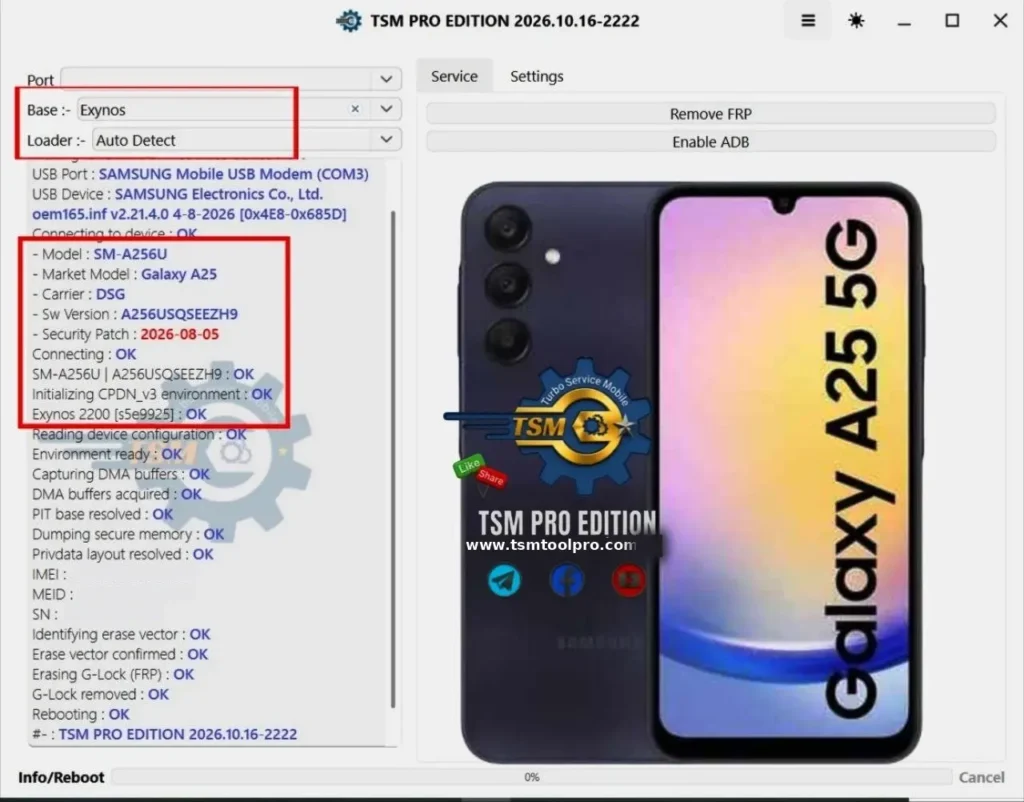
This Galaxy A25 5G came in stuck on the Google account verification screen after a reset. I hooked it up to TSM PRO Edition (2026.10.16-2222) and ran the FRP removal job. The phone connected on the first try through the Samsung modem port; the tool read the full device info, and the G-Lock came off clean. The phone rebooted; no more Google lock.
Tool Settings
- Port:-
- Base :- Exynos
- Loader :- Auto Detect
Service
USB Connection
- USB Port : SAMSUNG Mobile USB Modem (COM3)
- USB Device : SAMSUNG Electronics Co., Ltd.
- oem165.inf v2.21.4.0 4-8-2026 [0x4E8-0x685D]
- Connecting to device : OK
Device Info
- Model: SM-A256U
- Market Model: Galaxy A25
- Carrier: DSG
- Sw Version : A256USQS9EEZH9
- Security Patch: 2026-08-05
- Connecting: OK
- SM-A256U | A256USQS9EEZH9 : OK
Initialization
- Initializing CPDN_v3 environment : OK
- Exynos 2200 [s5e9925] : OK
- Reading device configuration : OK
- Environment ready : OK
- Capturing DMA buffers : OK
- DMA buffers acquired : OK
- PIT base resolved : OK
- Dumping secure memory : OK
- Privdata layout resolved : OK
- IMEI :
- MEID :
- SN :
FRP Operation
- Erase vector: OK
- Erase vector confirmed: OK
- Erasing G-Lock (FRP Identifying): OK
- G-Lock removed: OK
- Rebooting: OK