
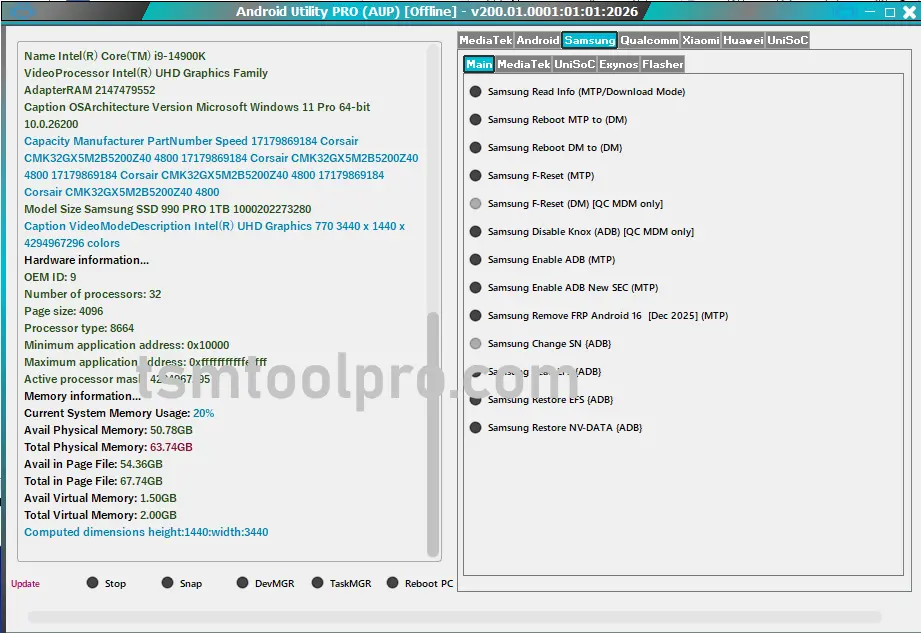
Android Utility Tool v200 R2 Dead Boot Repair Motorola Fix Infinix and Tecno AntiCrack
Introduction to Android Utility Tool v200 R2
Welcome to the in-depth guide for the Android Utility Tool v200 R2, your ultimate solution for tackling complex Android device issues. In the fast-evolving world of mobile technology, device malfunctions like dead boot, FRP locks, and anti-crack security measures can be daunting. This powerful tool is meticulously designed to empower technicians and advanced users alike, offering robust functionalities for a wide range of devices, including Motorola, Infinix, and Tecno.
Discover how v200 R2 brings new life to bricked devices and bypasses the toughest security protocols with unparalleled efficiency. From dead boot repair to advanced FRP unlocking and anti-crack removal, this version is packed with cutting-edge features to ensure your devices are back in action swiftly and securely.
Device Specifications
- Brand: Motorola, Infinix, Tecno, Samsung
- CPU Supported: Mediatek (MTK), Qualcomm (SPD)
- Android Version: Up to Android 16 (2025-2026 Security)
- Security Patch: Latest patches supported (e.g., 2024-11-01 SEC)
- Supported Methods: MTP, BROM, META, ADB
New Update Android Tool v200 R2: What’s Fresh!
- Samsung MTP FRP Bypass Android 16 [2025-2026]: Advanced support for the latest Android security.
- New Android Enhanced Security Key Decoder Function: Unlock even tougher encrypted devices.
- ADB-Enabled Option For Devices (Infinix, Tecno, iTel) via META MODE: Enhanced connectivity and control.
- Remove Anti-Crack Old Patch All Infinix, Tecno, iTel Via Meta Mode: Comprehensive anti-crack removal.
- Added support for Samsung Galaxy A24 4G (SM-A245F) [Helio G99-V6]: FRP removal via BROM mode (up to Bit 8 tested on 2024-11-01 SEC).
- Added MTK META IMEI Repair: Crucial for repairing device identity.
- Motorola SPD Read/Write Supported/FRP Reset: Extended support for Motorola devices.
Key Features of Android Utility Tool v200 R2
- Unlock Bootloader: Gain full control over your device’s software.
- Force Brom Mode: Access low-level operations for deep repairs.
- Dump Preloader: Backup critical boot information.
- Crash Preloader To Brom: Recover devices stuck in boot loops.
- Read Device info (Brom Mode): Detailed device diagnostics.
- Reboot AT Mode, Download Mode, Factory Mode, Fastboot Mode: Versatile reboot options.
- Flash Samsung & Huawei: Comprehensive flashing capabilities.
- Factory Reset MTP Mode: Quick factory reset without complex steps.
- Remove FRP MTP Mode (Sam New Sec): Bypass Google’s Factory Reset Protection on new Samsung security.
- Samsung Dead Boot A03/A03s: Specialized dead boot repair for common Samsung models.
Samsung Specific Features
- Samsung Read info (MTP): Quickly retrieve device details.
- Samsung Read Info (Download Mode): Access deeper device information.
- Samsung Reboot To Download Mode: Seamlessly transition to flashing mode.
- Samsung Factory Reset (MTP): Efficiently wipe device data.
- Samsung ADB Enable (New Security 2023): Enable ADB on challenging new security models.
- Samsung FRP Bypass (Adb Mode): Bypass FRP via ADB commands.
- Samsung Launch Browser Mtp (Youtube / Galaxy Store): Initiate browser for FRP bypass.
- Mobile Phone Unlocking: General unlocking capabilities.
Mediatek [MTK] Specific Features
- Read info (Brom): Deep-level information retrieval.
- Reboot AT Mode, FastBoot Mode, Recover Mode: Multiple essential reboot options.
- Dump Preloader EMI (Test Point): Critical for advanced data recovery.
- Disable Auth: Bypass authorization for certain operations.
- (eMMC/UFS) Health Check: Diagnose storage health.
- Vivo New Security Read info (Fastboot): Extract information from Vivo devices with new security.
- Vivo (Mt6765/6771) Force Brom & Exit Brom: Control Brom mode on specific Vivo chipsets.
- Vivo (Mt6765/6771) Remove Demo: Remove demo lock on supported Vivo devices.
Understanding FRP Lock and Its Bypass
What is FRP Lock? Factory Reset Protection (FRP) is a security feature implemented by Google in Android 5.1 (Lollipop) and later. It’s designed to prevent unauthorized access to your device if it’s lost or stolen. After a factory reset, if the device attempts to connect to the internet, it requires the last synced Google Account credentials to proceed.
How To Face FRP Lock In Android Devices: You typically encounter FRP lock when you factory reset a phone without removing the Google account beforehand, or when you purchase a used device that hasn’t been properly cleared by the previous owner. It acts as a digital barrier, ensuring only the legitimate owner can reactivate the device.
Why Remove FRP Locks & Common Triggers
Removing FRP locks is essential for various legitimate reasons, primarily when you have forgotten your Google account details, bought a second-hand phone with FRP enabled, or are a technician needing to service a device. FRP can render a device unusable, making its removal a crucial step for functionality.
Common FRP Lock Triggers:
- Forgotten Google Account: You no longer remember the linked Gmail ID and password.
- Used Device Purchase: The previous owner didn’t remove their Google account.
- Repair Shop Scenario: As a technician, you need to repair a customer’s device.
- Hard Reset Mishap: Accidental factory reset without proper account removal.
Android Utility Tool Pro: Your One-Click Solution
The Android Utility Tool v200 R2 is engineered for simplicity and effectiveness. It offers a one-click FRP lock removal feature, significantly reducing the complexity and time involved in bypassing this stringent security measure. This tool becomes indispensable for technicians aiming for fast and reliable solutions.
Android Utility Tool Support Samsung Android 16 Remove FRP Lock: With its advanced algorithms, v200 R2 proudly supports FRP lock removal on the latest Samsung devices running Android 16, addressing even the most recent security patches from 2025-2026.
Android Utility Tool Remove All Infinix iTel And Tecno Anti-Crack: Say goodbye to anti-crack protections. This tool provides a robust solution for Infinix, iTel, and Tecno devices, ensuring their full usability without hindrance via Meta Mode.
Android Utility Tool Repair IMEI MTK Devices, Unlock Bootloader: Beyond FRP, the tool excels in critical repairs like IMEI reconstruction for MTK devices and bootloader unlocking, opening up customization and advanced troubleshooting avenues.
Step-by-Step Guide: Using Android Utility Tool v200 R2
- 1
Download & Extract: Download the tool from the provided link and extract it using the password ‘mfdl’.
- 2
Disable Antivirus: Temporarily disable your antivirus software to prevent interference.
- 3
Install Drivers: Ensure all necessary USB drivers for your device are installed.
- 4
Run as Administrator: Launch the AndroidUtility.exe as an administrator.
- 5
Connect Device: Connect your Android device to the PC in the appropriate mode (MTP, Brom, Fastboot, etc.).
- 6
Select Function: Choose the desired function (e.g., FRP Bypass, Dead Boot Repair) from the tool’s interface.
- 7
Execute & Monitor: Click ‘Start’ or ‘Execute’ and closely monitor the process until completion.
Safety Tips & Precautions
- Backup Your Device: Always back up your data before attempting any flashing or unlocking procedures.
- Charge Your Device: Ensure your device has at least 50% battery charge to prevent interruptions.
- Use a Reliable PC: Work on a stable computer with proper USB ports.
- Avoid Disconnecting: Do not disconnect your device during any ongoing process.
- Follow Instructions: Adhere strictly to the tool’s instructions and guides to avoid bricking your device.
Real Success Story: Technician’s Insight

David M. from South Africa 🇿🇦
“This tool is a game-changer! I had a client with a dead boot Motorola G7, and after countless failed attempts with other tools, Android Utility Tool v200 R2 brought it back to life. The new anti-crack feature also saved me on an Infinix Note 10. Easily earned me an extra $7 today, thanks to its reliability and speed. Highly recommended for any professional technician!”
Summary Table: Android Utility Tool v200 R2 Capabilities
| Feature | Description | Supported Devices |
|---|---|---|
| FRP Bypass | One-click removal of Factory Reset Protection. | Samsung (Android 16), Infinix, Tecno, iTel |
| Dead Boot Repair | Revives bricked devices. | Motorola, Samsung A03/A03s |
| Anti-Crack Removal | Bypasses old anti-crack patches. | Infinix, Tecno, iTel (via Meta Mode) |
| IMEI Repair | Fixes corrupted IMEI numbers. | MTK Devices |
| Bootloader Unlock | Unlocks device bootloader for custom ROMs. | General Android, specific MTK/SPD |
Extra Bonus Information
Beyond its core features, Android Utility Tool v200 R2 includes advanced debugging tools and device information readers that can be invaluable for diagnosing complex issues. Its META MODE capabilities for Infinix, Tecno, and iTel significantly expand its reach for deep-level operations. Always refer to the official documentation or community forums for specific device model support and detailed guides to maximize the tool’s potential.
Regular updates ensure that the tool stays ahead of the curve, adapting to new security patches and device releases, making it a sustainable investment for any mobile technician.
Conclusion & Download
The Android Utility Tool v200 R2 stands out as a comprehensive and indispensable asset for anyone involved in Android device repair and maintenance. Its updated features, broad device support, and user-friendly approach make it a top choice for resolving complex issues like dead boot, FRP locks, and anti-crack security. Empower yourself with this robust tool and bring new life to otherwise unfixable devices.
Zip Password: mfdl
Frequently Asked Questions (FAQs)
Q: What is Android Utility Tool v200 R2?
A: It’s the latest version of a powerful software designed for repairing, unlocking, and bypassing security features on Android devices, specifically targeting dead boot issues, FRP locks, and anti-crack protections on brands like Motorola, Infinix, and Tecno.
Q: Does it support Samsung devices with Android 16?
Q: Can this tool remove anti-crack from Infinix/Tecno devices?
Q: Is IMEI repair possible for MTK devices?
Q: Where can I download the Android Utility Tool v200 R2?
Disclaimer: This article is for informational purposes only. Use this tool responsibly and in compliance with all applicable laws and regulations. We are not responsible for any damage or misuse of the software.
Table of Contents
- Android Utility Tool v200 R2 Dead Boot Repair Motorola Fix Infinix and Tecno AntiCrack
- Introduction to Android Utility Tool v200 R2
- Device Specifications
- New Update Android Tool v200 R2: What’s Fresh!
- Key Features of Android Utility Tool v200 R2
- Samsung Specific Features
- Mediatek [MTK] Specific Features
- Understanding FRP Lock and Its Bypass
- Why Remove FRP Locks & Common Triggers
- Android Utility Tool Pro: Your One-Click Solution
- Step-by-Step Guide: Using Android Utility Tool v200 R2
- Safety Tips & Precautions
- Real Success Story: Technician’s Insight
- David M. from South Africa 🇿🇦
- Summary Table: Android Utility Tool v200 R2 Capabilities
- Extra Bonus Information
- Conclusion & Download
- Frequently Asked Questions (FAQs)
- Q: What is Android Utility Tool v200 R2?
- Q: Does it support Samsung devices with Android 16?
- Q: Can this tool remove anti-crack from Infinix/Tecno devices?
- Q: Is IMEI repair possible for MTK devices?
- Q: Where can I download the Android Utility Tool v200 R2?