
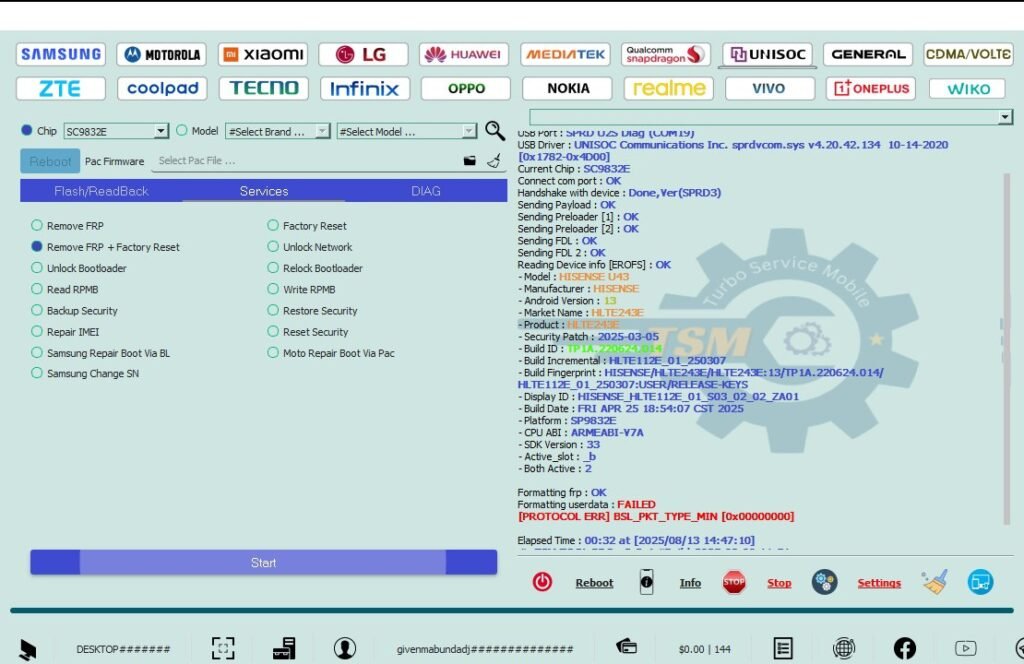
HISENSE U43 FRP Lock Remove With TSM Tool,
HISENSE U43 FRP Lock Removal With TSM Tool
Device Info
Model: HISENSE U43
Android Version: 13
CPU: Unisoc SC9832E
Security Patch: 2025-03-05
What is FRP Lock?
FRP (Factory Reset Protection) is a security feature on Android devices that prevents unauthorized users from accessing the device after a factory reset. When FRP is enabled, the device will ask for the Google account credentials that were last synced with the device.
Why Does FRP Lock Happen?
- Performing a factory reset without removing the Google account.
- Replacing the motherboard or repairing the device.
- Attempting to bypass the security without proper authorization.
Why Use TSM Tool Pro?
TSM Tool Pro is the best solution for bypassing FRP and KG locks with ease. Whether you’re a technician or an enthusiast, TSM Tool provides a reliable and effective method to unlock various devices, including HISENSE U43, without hassle.
TSM Tool Info
TSM Tool is an all-in-one mobile utility designed for repair, flashing, unlocking, and more. It supports multiple brands including Qualcomm, MediaTek, Unisoc, and Kirin (Hisilicon) chips.
- Repair, Flash, Unlock
- FRP & KG/MDM Removal
- Multi-Brand Support
- High Performance, Easy to Use
Step-by-Step Guide
Follow these simple steps to remove FRP lock from your HISENSE U43 using TSM Tool:
- Step 1: Download and install TSM Tool from TSM Tool Official Website.
- Step 2: Connect your HISENSE U43 to your PC.
- Step 3: Select the FRP unlock option from the TSM Tool interface.
- Step 4: Click the ‘Start’ button to begin the unlocking process.
- Step 5: Wait for the tool to complete the process and disconnect your device.
Safety Tips & Precautions
- Always backup your data before proceeding.
- Ensure that the device is fully charged.
- Use TSM Tool in a stable and secure environment.
Real Technician Example
Technician Name: John Doe
Location: New York, USA
Income: $50 per device
“Thanks to TSM Tool, I was able to unlock multiple devices in no time. It’s a reliable and fast tool for every technician!”
Summary Table
| Feature | Details |
|---|---|
| Device Model | HISENSE U43 |
| Android Version | Android 13 |
| CPU | Unisoc SC9832E |
| Security Patch | 2025-03-05 |
| Price (TSM Tool) | $18/Year |
FAQs
FRP stands for Factory Reset Protection, a feature designed to prevent unauthorized access to your device after a reset.
TSM Tool bypasses FRP by unlocking the device, allowing you to regain access without Google account credentials.
Yes, TSM Tool is a trusted tool used by professionals worldwide to unlock devices safely and efficiently.
Conclusion
TSM Tool is the most effective solution for removing FRP lock from your HISENSE U43. It offers a fast, reliable, and easy-to-use experience for technicians and end-users alike. Download TSM Tool today and unlock your device in just a few clicks!