
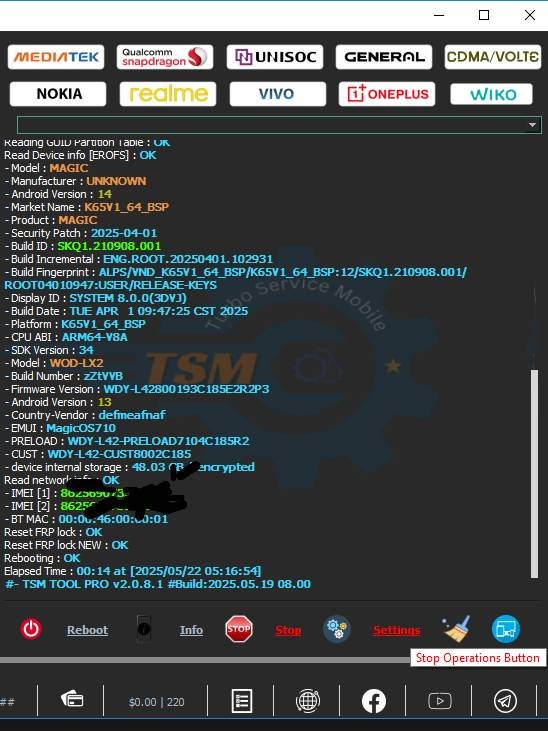
Honor X5 Plus WOD-LX2 FRP Remove With TSM Tool
Device Info
| Brand | Honor X5 Plus |
|---|---|
| Model | WOD-LX2 |
| CPU | Mediatek Helio G36 (12 nm) |
| Android | 13 |
| Security Patch | 2025-04-01 |
| Mode | Preloader Mode |
| Method | FRP Lock Remove |
| By | TSM TOOL Official |
What is KG Lock?
KG Lock (Knox Guard) is a factory security protocol that prevents unauthorized firmware modification or resetting of your device.
Why KG Lock Happens
- Unauthorized factory reset
- Google account not removed
- Remote lock activation
- Triggered by test firmware or flash
Why Use TSM Tool Pro?
- Fast unlocking process
- Supports wide device range
- Official & trusted source
- Safe and tested by technicians
Download: https://tsmtoolpro.com/
Step-by-Step Guide
- Open TSM Tool
- Go to Samsung Tab
- Select Honor WOD-LX2 Model
- Click FRP Remove Option
- Click Start Button
- Connect Honor X5 Plus in Test Point Mode
Safety Tips & Precautions
- Ensure the battery is 50%+
- Use original USB cable
- Backup your important data
- Never disconnect mid-process
What is FRP Lock?
FRP (Factory Reset Protection) is a Google security feature that prevents device access after a factory reset if Google credentials aren’t verified.
Real Technician Example
Name: Abrm Baloch
Shop: A.One Mobile Shop
Location: Gwadar, Balochistan
WhatsApp: Click to Contact on WhatsApp
Summary Table
| Device | Android | Patch | CPU | Mode | Tool |
|---|---|---|---|---|---|
| Honor X5 Plus (WOD-LX2) | 13 | 2025-04-01 | Helio G36 | Preloader | TSM Tool |
FAQs
1. Is FRP removal safe?
Yes, if done correctly using trusted tools like TSM Tool.
2. Can I do it without a PC?
No, TSM Tool requires a PC for operation.
3. Will this void my warranty?
In some cases, yes. Use it for technical recovery only.
4. What if my phone doesn’t detect in test point mode?
Ensure drivers are installed and cable is properly connected.
Table of Contents
- Honor X5 Plus WOD-LX2 FRP Remove With TSM Tool
- Device Info
- What is KG Lock?
- Why KG Lock Happens
- Why Use TSM Tool Pro?
- Step-by-Step Guide
- Safety Tips & Precautions
- What is FRP Lock?
- Real Technician Example
- Summary Table
- FAQs
- 1. Is FRP removal safe?
- 2. Can I do it without a PC?
- 3. Will this void my warranty?
- 4. What if my phone doesn’t detect in test point mode?