
SamsTool Online v1.33 Free Download
[New Tool]
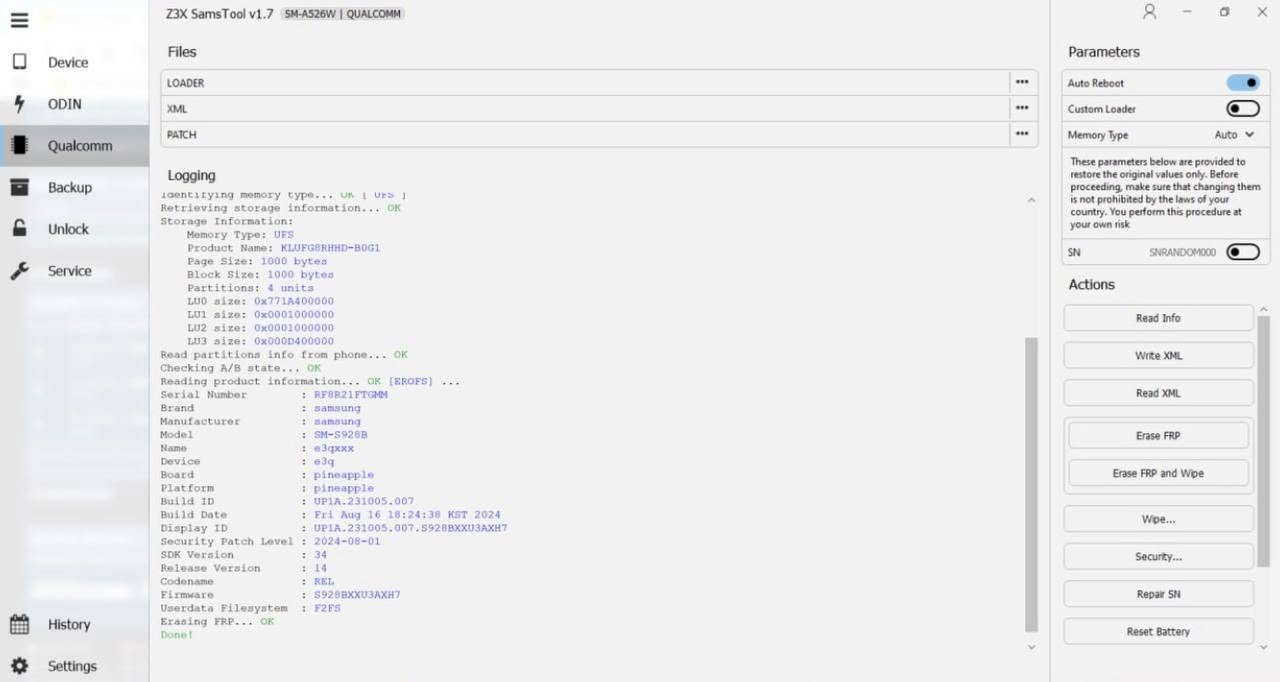
The Samsung Unlocking Tool Everyone’s Talking About
If you work in a GSM repair shop or just love keeping your Samsung devices free, SamsTool Online v1.33 is the upgrade you didn’t know you needed. This is the next-gen successor to the legendary Z3X Samsung Box, rebuilt from the ground up to be lightweight, fast, and packed with features that used to cost a small fortune.
Here’s the headline: SamsTool Online is now only the second tool in the world — after Chimera — to offer one-time activation for unlocking almost any Samsung Exynos device. No monthly fees. No token burning. Just pay once and get to work. That’s a massive deal for anyone tired of subscription traps.
Version 1.33 brings even more firepower — AUTOROOT support, new EDL loaders, bug fixes, and an ever-growing device list. Let’s break it all down.
Good news: One-time activation means zero recurring costs — a first in the budget Exynos unlocking space.
🔍 What Is SamsTool Online?
SamsTool Online is a professional-grade Samsung service tool designed for technicians, resellers, and power users. It handles everything from FRP bypass and network unlocking to IMEI repair, firmware flashing, and bootloader management — all through a clean, simple interface.
Think of it as your all-in-one Samsung toolkit that replaces several paid subscriptions with a single, affordable one-time purchase. It works via EUB (Emergency USB Boot) mode and ADB, giving you deep hardware-level access without needing physical box hardware.
Pro Tip: SamsTool Online runs as a web-connected desktop app — no hardware dongles or physical boxes required.
⚡ Key Features of SamsTool Online
SamsTool covers an impressive range of functions. Here’s everything you can do with it right now:
-
Switch to EUB Mode — deep hardware access for repair and flash -
Reset FRP (Factory Reset Protection) including Android 16 support -
Read Unlock Codes — network, region, and carrier unlock codes -
Repair IMEI & Serial Number (SN) on supported models -
Change CSC (Country/Carrier Code) without full factory wipe -
Unlock & Relock Bootloader — with Relock-to-Carriers support -
Update Firmware & Patch Certificate — CERT read/write support -
Repair Boot & Easy Partition Manager — full storage management -
Set KG State & Remove Security Warnings — Knox-related fixes -
Read/Write Device Backups & Reset Battery Status
☄️ SamsTool Online v1.33 — What’s New?
Version 1.33 ships with two big additions: expanded EDL loader support and a brand-new AUTOROOT function. Here’s the full breakdown:
🆕 New BIT Support (EDL Loaders)
| Model | BIT Version |
|---|---|
| SM-A236B | BIT E |
| SM-A736B | BIT B |
| SM-E236B | BIT E |
| SM-M145F | BIT B |
| SM-S918U | BIT 7 |
| SM-S928N | BIT 5 |
🌱 AUTOROOT — New Function
This is the standout feature in v1.33. AUTOROOT lets you root your Samsung device in a streamlined 4-step process:
Required before you can do anything else. Use SamsTool’s built-in Bootloader Unlock function.
Browse for the correct firmware files and load them in the SamsTool software interface.
Hit the button and let SamsTool handle the rooted flash process automatically.
Once flashing is done, connect via ADB and click
Install Root APK (ADB) to finish.🔥 Recommended Success Reports
 Free Download MOBILedit Forensic ULTRA v9.8.0.34378 Latest Update Download – UNISOC & EXYNOS Security Bypass Added✔
- Free Download Anti-Crack Tool Aftersales Toolbox V4 2025- Remove Anti-Crack MTK SPD Devices [ Infinix, Tecno , Itel ]✔
- Google Pixel 9 Pro IMEI 0000 Fix File [Bootloader Unlock]✔
- Remove Anti Crack Transsion Infinix Tecno Itel By TSM TOOL PRO✔
- Google Pixel 7 IMEI 0000 Fix File [Bootloader Unlock]✔

Warning: Rooting will trip Knox — some banking apps and Samsung Pay will stop working after this process.
📜 Version History at a Glance
| Version | Key Highlights |
|---|---|
| v1.33 |
AUTOROOT added · 6 new EDL BITs (A236B, A736B, S918U, S928N…) |
| v1.32 |
Exynos 9810 EUB support · ODIN BL auto-selection · Bug fixes |
| v1.31 |
Manual MCC/MNC input for Relock · 26+ new EDL loaders |
| v1.29 |
DFTSU Patch CERT support · Faster EUB connection · FRP fix Android 16 |
| v1.28 |
FRP Reset for Android 16 · Exynos 9820/9825 EUB · Galaxy A17, Tab A11 support |
| v1.27 |
FRP erase via patch commands · “Checking BL file” error fix · Exynos 1480 boot repair |
| v1.24 |
Relock to Carriers (20+ models incl. S928U, S931U) · Faster ADB · Patch CERT fix |
| v1.23 |
Read Codes for Galaxy A06, A14, F05, M05 · MediaTek firmware support |
| v1.22 |
15 new EDL BITs including S928Q · Loader initialization fixes |
| v1.20 |
🌍 World-first Android 15 CERT Repair for SM-A346, SM-A055, SM-A065 |
📊 SamsTool Online — Key Facts
👍 Pros & Cons
✅ Pros
- ✔ One-time activation — no subscriptions
- ✔ Covers Exynos AND some MediaTek devices
- ✔ Constantly updated — version 1.33 already!
- ✔ No physical dongle or hardware box needed
- ✔ AUTOROOT now built-in
- ✔ FRP Reset supports Android 16
- ✔ World-first Android 15 CERT repair
❌ Cons
- ✖ Primarily Exynos-focused — Snapdragon support is limited
- ✖ AUTOROOT voids Knox warranty
- ✖ Requires Windows PC — no macOS version
- ✖ Some advanced features need EUB mode knowledge
⚖️ SamsTool vs. The Competition
| Feature |
SamsTool Online |
Chimera Tool |
Z3X Box |
|---|---|---|---|
| One-time Activation | ✅ Yes | ✅ Yes | ❌ Tokens |
| Exynos Unlocking | ✅ Almost all | ✅ Full support | ⚠️ Limited |
| Hardware Required | ❌ Software only | ❌ Software only | ✅ Physical box |
| FRP Android 16 | ✅ Supported | ✅ Supported | ⚠️ Partial |
| AUTOROOT | ✅ v1.33+ | ❌ Not native | ❌ No |
| Regular Updates | ✅ Frequent | ✅ Frequent | ⚠️ Slow |
| Price | 💲 Budget-friendly | 💲💲 Mid-range | 💲💲💲 Premium |
💬 What GSM Technicians Are Saying
“I was stuck on a Galaxy S22 Exynos with a boot loop nightmare. Z3X tokens were eating my profits every month. Switched to SamsTool Online and not only did I fix the boot issue in under 10 minutes — I also unlocked three other phones the same afternoon. The one-time activation alone paid for itself in week one.”
⬇️ How to Download & Install SamsTool Online v1.33
Use the official MEGA link provided below. This is the clean, verified build.
Use WinRAR or 7-Zip to extract the archive. Place the folder somewhere easy to find.
Right-click the
.exe and choose “Run as Administrator” for proper driver installation.Enter your one-time activation credentials. Once done, you’re set for life — no renewals needed.
Boot the Samsung into EUB or download mode, connect via USB, and select your operation.
Tip: Disable Windows Defender or antivirus temporarily during installation — GSM tools often trigger false positives due to low-level USB driver access.
❓ Frequently Asked Questions
Is SamsTool Online completely free to download?
Does SamsTool Online work on Snapdragon Samsung phones?
Will using SamsTool Online brick my Samsung phone?
What is EUB mode and do I need to know it to use SamsTool?
Does AUTOROOT in v1.33 work on all Samsung models?
🏁 Final Verdict — Should You Download SamsTool Online v1.33?
If you’re working on Samsung Exynos devices — whether you’re a full-time repair tech or just someone who hates being locked down — SamsTool Online v1.33 is worth every penny. The one-time activation model alone separates it from the token-hungry tools of the past.
Version 1.33 adds AUTOROOT to an already impressive toolkit, and the development team keeps shipping updates at a pace that shows real commitment. From Android 16 FRP fixes to world-first Android 15 CERT repair, this tool consistently stays ahead of the curve.
Stop burning tokens. Stop paying monthly. Download SamsTool Online v1.33 today and take full control of your Samsung devices.
📚 References
- TSM Tool Pro — Official Website
- SamsTool Online v1.33 — Official MEGA Download
- SamsTool Online Official Changelogs (v1.18 – v1.33)
- Samsung Exynos Chipset Documentation — Samsung Developer Portal
- GSM Community Feedback — XDA Developers Forum