
UT Tool v2.0 Latest Version Free Download – 2026
The all-in-one mobile unlocking solution for technicians
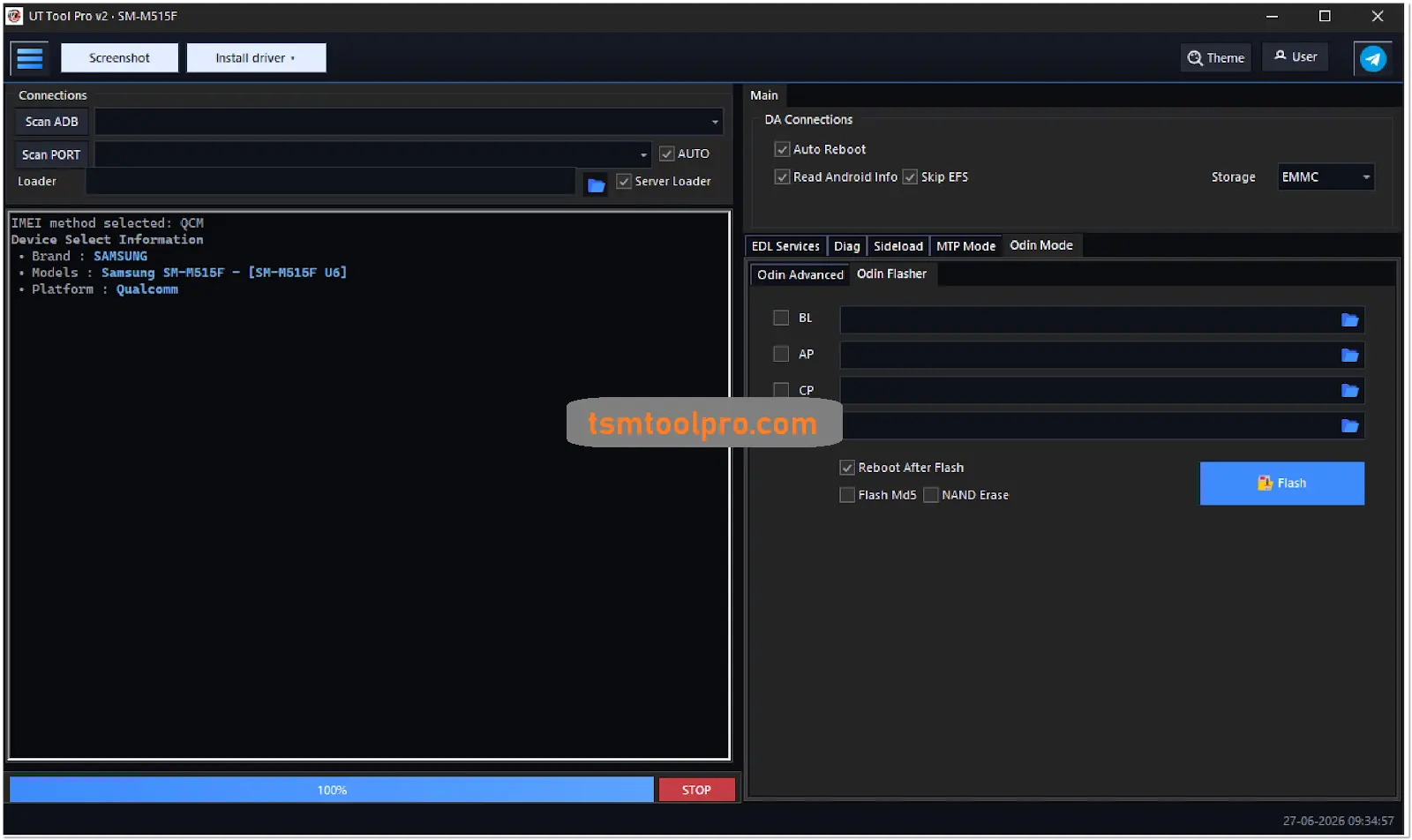
Got a stack of locked phones piling up on your workbench? UT Tool v2.0 Latest Version might be exactly what you need. This multi-brand flashing tool handles everything from FRP bypass to screen lock removal on over 1,500 device models across 10 major brands.
“I’ve been using UT Tool v2.0 for about three months now. It’s cut my FRP removal time in half on Samsung devices. The interface is straightforward, and I don’t have to jump between different tools anymore.”
🔧 What UT Tool v2.0 Actually Does
UT Tool v2.0 isn’t just another FRP bypass tool. It’s a complete mobile servicing package that handles multiple operations across different chipsets. The tool works with Qualcomm, MediaTek, and Samsung’s proprietary Exynos processors.
I personally like how it organizes functions by brand rather than by operation type. When you select Samsung, you see Samsung-specific options. Pick Xiaomi, and the interface adapts. (Makes sense when you think about how different each manufacturer’s security implementation is.)
FRP removal for 1,500+ models across 10 brands
Screen lock removal (pattern, PIN, password)
Firmware flashing for MediaTek and Qualcomm devices
Factory reset with safe data wipe options
The tool also includes basic ADB functions like screenshot capture, APK installation, and device information reading. Not groundbreaking stuff, but handy to have in one place.
📱 Supported Brands & Models
UT Tool v2.0 covers a massive range of devices. Here’s the breakdown by brand with approximate model counts (based on the official list):
| Brand | Model Count | Key Series Covered |
|---|---|---|
Samsung | ~300+ | Galaxy A/J/S/Note series, Z Fold/Flip, Tabs |
Xiaomi/Redmi/Poco | ~250+ | Redmi Note series, Poco X/M series, Mi Mix |
Huawei/Honor | ~200+ | Y series, P series, Mate series, Honor X/Y |
Infinix | ~150+ | Hot, Note, Zero, Smart series |
Tecno | ~150+ | Camon, Spark, Pova, Pop series |
Other Brands | ~450+ | Asus, Hisense, OnePlus, Oppo, Realme, ZTE |
The Samsung support is particularly strong, covering everything from the Galaxy A01 to the latest Z Fold6. For Huawei, it includes both older models and newer ones like the Honor 200 Lite. (Though keep in mind that newer Huawei devices have tighter security that might not be fully supported yet.)
⚡ Key Functions Breakdown
UT Tool v2.0 organizes its functions into several categories. Here’s what you can actually do with it:
FRP Removal
This is the bread and butter of the tool. It supports FRP bypass for Samsung, Huawei, Qualcomm, and MediaTek devices. The process varies by brand – Samsung uses its own method, while MediaTek devices often require Meta mode or Preloader access.
Screen Lock Removal
Works with pattern, PIN, password, and privacy password locks. The success rate varies by device and Android version. Newer devices with hardware-backed security might not be fully supported.
Firmware Operations
The MediaTek and Qualcomm sections include read/write firmware functions, partition management, and backup/restore capabilities. You’ll need the correct scatter files for MediaTek devices and XML firmware for Qualcomm.
Factory Reset
Includes standard factory reset, safe format data, wipe cache, and user data erase options. The “safe format” option is useful when you want to reset without triggering certain security checks.
And let’s be honest – not every function works perfectly on every device. Some operations might fail on newer security patches. That’s just the nature of these tools.
🛠️ Installation Guide
Getting UT Tool v2.0 up and running is straightforward. Here’s the step-by-step process:
Download the setup file from the link below and run it as administrator. (Right-click > Run as administrator)
Accept the license agreement and continue through the installation screens. Nothing unusual here.
Select the installation folder. Keep the default settings unless you have a specific reason to change them.
Allow the installer to add drivers and create a desktop shortcut. These drivers are essential for device communication.
🔥 Recommended Success Reports

If the setup asks to close ADB or other running files, let it close them automatically. Don’t skip this step.
After installation completes, open the tool and sign in with your login details. (You’ll need to create an account if you don’t have one)
Select the brand and model you want to work with. The supported functions will appear on the right side of the screen.
⚖️ Pros & Cons
Pros
Supports 1,500+ models across 10 brands in one tool
Covers multiple operations: FRP, screen lock, flashing
Brand-specific interface adapts to selected manufacturer
Includes both ADB and Fastboot modes for flexibility
Regular updates adding new device support
Cons
Requires login account to use the tool
May trigger false positives with antivirus software
Success rate varies on newer Android versions
No direct support for Apple devices
Is UT Tool v2.0 free to use?
Does UT Tool work on Windows 11?
Can UT Tool remove FRP on Samsung Galaxy S23?
Do I need special cables to use UT Tool?
How often is UT Tool updated?
UT Tool v2.0 Latest Version stands out as a versatile option for mobile technicians dealing with multiple brands. With support for over 1,500 models and a range of functions from FRP removal to firmware flashing, it reduces the need to switch between different tools. While it’s not perfect for every device or security patch, it covers the majority of common repair scenarios you’ll encounter in a typical shop.
Disclaimer: This tool is provided for educational and professional mobile repair purposes only. Use of this tool for unauthorized access to devices is illegal. The developers and this website are not responsible for any device damage, data loss, or legal issues arising from improper use. Always ensure you have proper authorization before performing any operations on a device.