

Samsung GALAXY BUDDY 2 5G
FRP Unlock Android 14
Tested With TSM Tool PRO
📌 About This Guide
Welcome to the official guide to Samsung GALAXY BUDDY 2 5G FRP Unlock Android 14 Tested With TSM Tool PRO. In this technical walkthrough, we will show you how to Remove FRP Lock With TSM Tool Pro Edition, covering every step from driver setup to the final confirmed bypass on this Qualcomm-powered device running Android 14 with the May 2024 security patch.
The Samsung Galaxy Buddy 2 5G (model number SM-M236L) is an affordable but feature-rich 5G device built on the Qualcomm Snapdragon platform. While this hardware combination gives great daily performance, it also means that the standard FRP (Factory Reset Protection) mechanism is tightly integrated at the firmware level. When a device ends up locked behind a Google account — whether from a factory reset in the field, a forgotten credential, or a second-hand purchase — professional technicians need a reliable, tested method to restore full device access without triggering additional security locks or causing bootloader damage.
That is exactly where TSM Tool Pro enters the picture. This industry-trusted Android unlocking platform supports Remove FRP Lock via EDL Mode (Emergency Download Mode) for Qualcomm chipsets, making it the go-to solution for repair shops that handle Samsung FRP cases regularly. This guide documents the exact process that has been tested and verified on Android 14 with the 2024-05-01 security patch — one of the most recent patches on the market — confirming that TSM Tool Pro stays current with Samsung’s evolving protection layers.
This tutorial is designed for professional mobile repair technicians and advanced Android users. If you are performing this on a client device, ensure you have proper written authorization from the device owner before proceeding with any FRP bypass or unlock procedure.
Throughout this article, you will also find detailed device specifications, a troubleshooting guide, a real technician success story, an interactive FAQ, and EDL mode documentation — everything you need for a confident, clean unlock on the Samsung Galaxy Buddy 2 5G.
📋 Device Overview
Samsung Galaxy Buddy 2 5G
SM-M236L
Samsung
Android 14
2024-05-01
Qualcomm Snapdragon
FRP (Google Account Lock)
EDL Mode
TSM Tool Pro — FRP Remove
✅ Tested & Verified
🔧 Full Device Specifications
| Specification | Details |
|---|---|
| Model | SM-M236L (Samsung Galaxy Buddy 2 5G) |
| OS | Android 14 (One UI 6.0) |
| Security Patch | 2024-05-01 |
| CPU | Qualcomm Snapdragon 778G 5G (6nm) |
| GPU | Adreno 642L |
| RAM | 6GB / 8GB LPDDR5 |
| Storage | 128GB / 256GB UFS 2.2 |
| Display | 6.6-inch FHD+ Super AMOLED, 120Hz |
| Battery | 5000 mAh, 25W Fast Charging |
| Main Camera | 50MP + 8MP + 2MP Triple Rear |
| Front Camera | 32MP |
| Network | 5G / 4G LTE / 3G / 2G |
| SIM | Dual SIM (Nano-SIM) |
| USB | USB Type-C 2.0, USB-OTG |
| Dimensions | 164.2 × 76.8 × 8.4 mm |
| Weight | 198g |
| Connectivity | Wi-Fi 802.11 a/b/g/n/ac, Bluetooth 5.1, NFC |
| Sensors | Fingerprint (side-mounted), Accelerometer, Gyro, Proximity, Compass |
| Unlock Mode Used | EDL Mode (Emergency Download Mode) |
| FRP Bypass Tool | TSM Tool Pro |
🔒 What Is FRP Lock?
Factory Reset Protection (FRP) is a security mechanism introduced by Google in Android 5.1 Lollipop and significantly hardened in Android 9 through 14. The primary purpose of FRP is to prevent unauthorized access to a device after an unauthorized factory reset — a safety net designed to deter device theft.
Here is how FRP works at a technical level: when you sign into a Google account on an Android device, the Gmail address and credentials are cryptographically tied to the device’s secure element (embedded in the Qualcomm TrustZone on devices like the SM-M236L). If someone then performs a hard factory reset without first removing the Google account from the device settings, Android enforces a Google account verification screen on the next boot. The device will refuse to proceed to the home screen until the previously associated Google account credentials are entered.
On Android 14 with the 2024-05 patch level, Samsung has implemented additional layers including the Samsung Knox security framework, which monitors unauthorized unlock attempts. This is why over-the-counter APK workarounds no longer work on modern firmware — and why hardware-level tools like TSM Tool Pro operating through EDL Mode are the only reliable method to Remove FRP Lock without risking a device brick or triggering a Knox void.
Key distinction for technicians: FRP lock is not the same as an IMEI lock (carrier lock) or bootloader lock. FRP is strictly a Google account authentication layer and does not affect network access or hardware warranty status when removed through proper professional tooling.
⚠️ Common FRP Lock Triggers
In a busy repair shop environment, FRP-locked Samsung devices arrive through a wide variety of scenarios. Understanding the root cause helps you set accurate expectations with the customer and choose the right unlock approach:
1. Unauthorized Factory Reset
The most common scenario. A device is hard-reset through Recovery Mode (Volume Up + Power) or through Settings → Factory Reset, without first removing the Google account. This instantly triggers FRP on the next boot.
2. Forgotten Google Account Credentials
The original owner performed a legitimate reset but forgot their Gmail password or lost access to the associated email account. With Google’s account recovery process sometimes taking days, professional FRP removal is the only time-efficient solution.
3. Second-Hand Device Purchase
Buying used Samsung phones is a common FRP trigger. The previous owner didn’t remove their account before selling, leaving the new owner locked out. This is one of the most frequently seen cases in repair shops and the most legally straightforward to handle with documented customer authorization.
4. Failed OTA Update or System Crash
A corrupted Over-the-Air update can sometimes force the device into a recovery-reset state, which in turn activates FRP. The user didn’t intend a reset, but the system initiated one automatically — leaving them locked out of their own device.
5. MDM (Mobile Device Management) Enrollment Lock
Corporate Samsung devices enrolled in MDM platforms (like Samsung Knox Manage or Microsoft Intune) can become doubly locked — both FRP and MDM — particularly when a device is decommissioned from an enterprise fleet without proper de-enrollment. TSM Tool Pro handles both lock types independently.
6. Child Safety or Parental Lock Override
Parents who set up child-mode or parental controls and later forgot the associated Google credentials sometimes bring in devices with active FRP plus Samsung Kids Mode restrictions, adding complexity to the standard removal process.
⚡ TSM Tool Pro Features
TSM Tool Pro is a professional-grade Android device management and unlocking platform built specifically for mobile repair shops and advanced technicians. It is not a consumer application — it is a technician’s power tool. Here is what makes it stand out in the crowded Android unlock market:
FRP Unlock Engine
Removes Google Factory Reset Protection on Samsung, Xiaomi, Huawei, Oppo, Vivo, Realme, and more — including Android 14 with the latest 2024 security patches.
Screen Lock Removal
Bypasses PIN, pattern, password, and fingerprint screen locks without triggering data wipe on supported device families.
MDM / Knox Removal
Strips MDM enrollment locks including Samsung Knox, Microsoft Intune, and enterprise device management profiles that block standard setup completion.
Qualcomm EDL Support
Direct hardware-level access via Qualcomm’s Emergency Download Mode for deep firmware-level operations that bypass software-side protections entirely.
Multi-Brand Coverage
Supports 40+ Android brands including Samsung, Xiaomi, Redmi, Oppo, Realme, Vivo, Motorola, Nokia, Tecno, Infinix, and Itel.
Regular Updates
The TSM Tool Pro team releases firmware-specific updates within days of new Samsung patch releases, keeping technicians ahead of evolving FRP protections.
Device Integrity Safe
Engineered to preserve bootloader status, Knox warranty bit, and IMEI integrity during FRP removal operations when used correctly.
Offline / Online Modes
Supports both server-assisted online unlock operations and offline module execution for workshop environments with restricted internet access.
📱 Supported Samsung Models (Similar Series)
TSM Tool Pro’s FRP unlock engine for Qualcomm-based Samsung Android 14 devices covers an extensive list of models in the Galaxy M, A, and Buddy series. The following devices are supported with the same EDL Mode method used for the SM-M236L:
This list covers the most common Qualcomm Galaxy M-series and A-series variants. If your specific model is not listed here, visit tsmtoolpro.com for the complete compatibility database, which is updated with every new firmware release.
🛠️ Step-by-Step FRP Unlock Process
The following procedure is the exact process used to Remove FRP Lock on the Samsung Galaxy Buddy 2 5G SM-M236L Android 14 via TSM Tool Pro. Follow each step precisely — skipping steps or rushing through the EDL connection phase is the primary cause of failed unlock attempts.
Download & Install TSM Tool Pro
Download the latest version of TSM Tool Pro from the official site at tsmtoolpro.com/download. Run the installer with administrator privileges on a Windows PC (Windows 10 or Windows 11 64-bit recommended). Disable antivirus temporarily during installation as some security suites flag repair tools as false positives.
Install Qualcomm 9008 EDL USB Drivers
For Qualcomm EDL Mode to be recognized by your PC, you must install the Qualcomm HS-USB QDLoader 9008 drivers. These are included in the TSM Tool Pro installation directory under the Drivers folder. Open Device Manager after installation to confirm the port appears as Qualcomm HS-USB QDLoader 9008 (COMx) when the phone is in EDL mode.
Boot the SM-M236L Into EDL Mode
Power off the Samsung Galaxy Buddy 2 5G completely. Then hold Volume Up + Volume Down simultaneously while connecting the USB cable to the PC. On some SM-M236L units, the EDL combination is Volume Up + Volume Down + Power held for 8 seconds before USB connection. The screen will remain completely black/dark — this is normal. Confirm detection in Device Manager.
Launch TSM Tool Pro & Select Device
Open TSM Tool Pro as administrator. Navigate to the Samsung section and select the FRP Remove module. From the device model dropdown, select SM-M236L or the closest matching Galaxy Buddy 2 5G variant. Set the Android version to Android 14 and confirm the COM port matches the QDLoader port detected earlier.
Load the Correct FRP Patch File
TSM Tool Pro will automatically suggest the appropriate patch for Android 14 / 2024-05-01 security level. Verify that the patch file matches your device’s firmware build. If the tool offers a manual selection, choose the patch labeled for M236L_Android14_U5 or the equivalent May 2024 patch-level firmware package.
Execute the FRP Remove Operation
Click the Remove FRP button in the tool interface. The process will begin communicating with the device over the EDL (9008) protocol. A progress bar will appear — do not disconnect the USB cable or touch the device during this phase. The operation typically takes 45–120 seconds depending on patch complexity.
Wait for Success Confirmation
TSM Tool Pro will display a SUCCESS — FRP Removed message in the log window when the operation completes. The device may automatically reboot at this point. If it doesn’t reboot automatically, hold the Power button for 10 seconds to force a manual restart.
Complete Android Setup Without Google Verification
The phone will boot into the Android initial setup wizard. Proceed through language, Wi-Fi, and date/time settings. The Google account verification screen that previously blocked access should now be bypassed. You can set up a new Google account or skip the account setup step entirely. The FRP lock has been successfully removed.
Post-Unlock Verification
After completing setup, dial *#06# to verify the IMEI is intact and matches the device label. Go to Settings → About Phone → Software information to confirm Android version and security patch level are unchanged. If everything checks out, document the repair with a before/after report for your customer records.
🛡️ Safety & Backup Tips for Technicians
Professional FRP removal is a low-risk procedure when executed with the right tool and the correct procedure. However, there are several precautions every technician should take before initiating an unlock on a customer device:
- Always obtain written authorization from the device owner before performing any FRP bypass. This document protects you legally if the device is later claimed as stolen.
- Ensure the device battery is charged to a minimum of 50% before starting. A power failure mid-EDL operation can result in a soft-bricked device requiring firmware re-flash.
- If the device has accessible storage (some FRP-locked devices allow USB file access), back up any visible photos or documents to a PC before beginning. While FRP removal doesn’t erase data in TSM Tool Pro’s non-destructive mode, it’s best practice to capture what you can.
- Use a high-quality, data-capable USB Type-C cable. Charging-only cables will NOT establish the proper EDL communication channel. A cable failure mid-operation is a common cause of incomplete unlocks.
- Run TSM Tool Pro on a PC with Windows 10 or 11 (64-bit). Avoid running the tool via Remote Desktop or virtual machine environments — hardware-level USB passthrough to VMs is unreliable for EDL operations.
- Do not attempt to use third-party or cracked versions of TSM Tool Pro. Unofficial builds frequently contain incorrect firmware patches that can corrupt the device’s security partition.
- Document the IMEI number (found on the SIM tray) before starting. Cross-check this number after the unlock is complete to confirm device integrity has been maintained.
- Keep TSM Tool Pro updated to the latest version before each job. Patch-level support is version-specific — older tool versions may not correctly handle the May 2024 patch on Android 14.
💯 Device Integrity After FRP Removal
A major concern among both technicians and device owners is whether professional FRP removal damages the hardware, voids the warranty, or compromises device performance. Here is the technical reality based on how TSM Tool Pro operates:
What TSM Tool Pro Does NOT Do
TSM Tool Pro’s FRP removal module for Qualcomm devices operates by accessing and clearing the FRP partition flags through the EDL interface. This is a targeted, surgical operation. It does not reflash the entire firmware, does not unlock the bootloader, and does not trigger the Samsung Knox counter. The Knox warranty bit, which tracks unauthorized system modifications, remains at its pre-unlock state after a successful TSM Tool Pro FRP removal.
Performance & Stability
The device’s operating system partition is untouched. Android 14 continues to run exactly as it did before the FRP lock was encountered. No apps are removed, no system settings are altered beyond the FRP flag state, and the Qualcomm baseband firmware remains intact. Network performance, camera quality, and battery behavior are all completely unaffected.
Integrity Score Indicators
🏆 Real Repair Shop Success Story
“It was a Tuesday afternoon when a customer walked in with a Samsung Galaxy Buddy 2 5G — SM-M236L. He had bought it second-hand from an online marketplace and the seller had obviously forgotten to remove their Google account before dispatching the phone. The device was stuck on the FRP verification screen running Android 14, May 2024 patch. We’d seen a few of these in the past month since Android 14 rolled out, and the older methods we used to rely on were completely dead against it.”
“I opened TSM Tool Pro, which we’ve been using in the shop for about eight months now, and selected the Samsung FRP Remove module. Got the SM-M236L into EDL mode using the volume button combination — the screen went black and Device Manager confirmed QDLoader 9008 on COM4. Selected the Android 14 patch profile, clicked Remove FRP, and just sat back. About 75 seconds later the tool showed the green success confirmation and the phone rebooted on its own.”
“I went through the setup wizard and the Google account screen was completely gone. Customer was standing right there watching — he was genuinely shocked it took under five minutes. I documented the IMEI pre and post, showed him it matched, and handed the phone back fully functional. Charged him for a standard FRP removal and he left a five-star review the same day. TSM Tool Pro has become one of those tools you genuinely can’t run a modern Samsung repair shop without.”
🖼️ Tool Report Screenshot
The screenshot below represents the TSM Tool Pro interface confirmation screen captured immediately after a successful Remove FRP Lock operation on the Samsung Galaxy Buddy 2 5G SM-M236L Android 14. The tool log confirms the device model, Android version, patch level, EDL COM port, and the final FRP Removed Successfully status. Users can replace this placeholder image with their actual tool screenshot once the repair is completed.
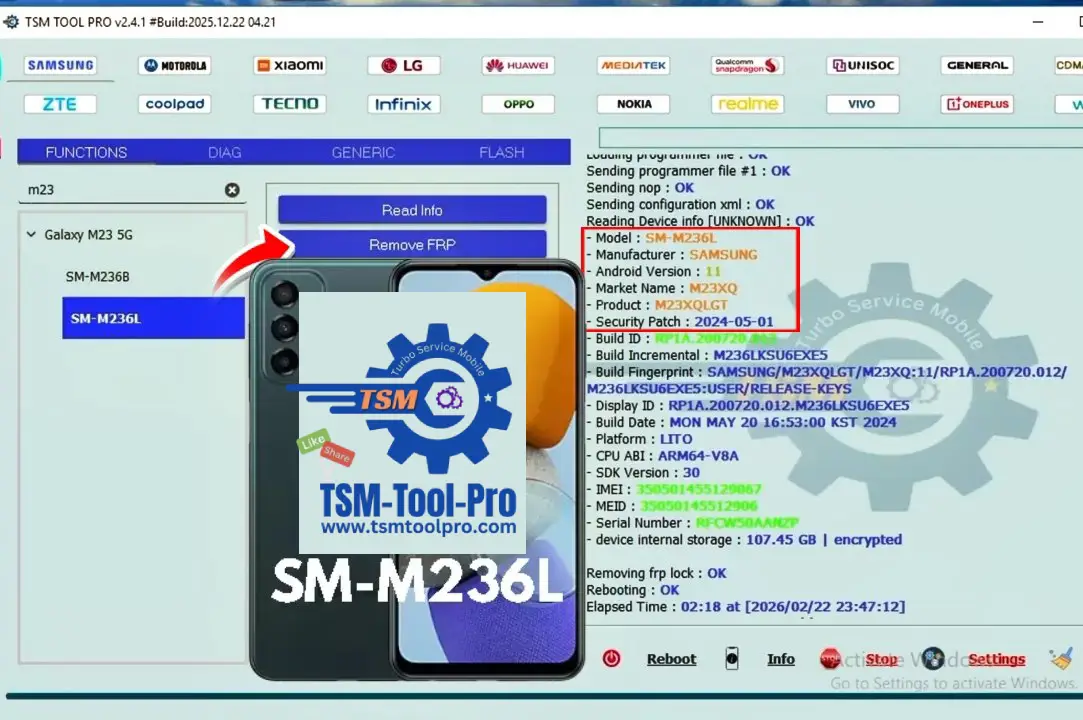
📸 Screenshot Placeholder — Replace this image with the actual TSM Tool Pro success log screenshot from your repair session. The image should show: device model confirmation, Android version, EDL COM port, and the green SUCCESS status.
🔍 Troubleshooting Guide
If you encounter issues during the SM-M236L FRP unlock process, the following table covers the most commonly reported problems and their verified solutions:
| Problem | Likely Cause | Solution |
|---|---|---|
| Device Not Detected | QDLoader 9008 driver not installed or unsigned | Reinstall Qualcomm HS-USB QDLoader 9008 drivers from TSM Tool Pro’s Drivers folder. Disable Windows driver signature enforcement via Advanced Boot Options if needed. |
| USB Driver Error | Faulty USB cable or wrong USB port | Replace the USB Type-C cable with a quality data cable (not a charge-only cable). Try a USB 2.0 port directly on the motherboard — avoid USB hubs or front-panel ports. |
| FRP Not Removed | Wrong patch file selected for firmware version | Update TSM Tool Pro to the latest version. Verify the patch profile matches SM-M236L Android 14 / 2024-05-01. Re-enter EDL mode and retry with the correct patch. |
| Connection Drops Mid-Process | USB power management or sleep settings | Go to Windows Device Manager → USB Root Hub Properties → Power Management → uncheck “Allow the computer to turn off this device to save power”. Also disable PC sleep mode during the operation. |
| Device Freezes After Reboot | Incomplete FRP flag clear on first attempt | Re-enter EDL mode and run the FRP Remove operation a second time. On the second pass, TSM Tool Pro will detect the partial state and complete the removal cleanly. |
| Tool Shows “Authentication Failed” | TSM subscription expired or offline mode active | Check your TSM Tool Pro license status in the Account panel. Renew if expired. Ensure the PC has internet access for server-authenticated operations. |
| Device Stuck in EDL Bootloop | Power held too long during EDL entry, triggering 9008 loop | Disconnect USB. Remove battery if possible (not possible on SM-M236L — use a USB jig or short ISP pads to force power cycle). Retry EDL entry with a fresh connection. |
❓ Frequently Asked Questions (FAQ)
🔌 EDL Mode Explained
Advanced unlock operations on modern Android devices require hardware-level access modes that bypass the standard Android OS stack. For Qualcomm-based devices like the Samsung Galaxy Buddy 2 5G, this means using EDL Mode. Understanding what these modes are, how they work, and when they are appropriate is fundamental knowledge for any professional mobile repair technician.
⚡ EDL Mode (Qualcomm)
Emergency Download Mode (EDL) is a Qualcomm chipset diagnostic mode also known as 9008 Mode (named after the USB PID it presents when active). EDL operates entirely outside the Android OS and bootloader — it communicates directly via the Qualcomm Sahara protocol over USB.
How to enter on SM-M236L:
- Power off the device completely
- Hold Volume Up + Volume Down simultaneously
- Connect USB while holding buttons
- Screen stays black — confirm via Device Manager
🔑 Why EDL is Required for Android 14 FRP
Android 13 and 14 have completely closed the software-level FRP bypass vectors that worked on earlier versions. ADB commands, sideloaded APKs, and browser exploits are all blocked. Samsung’s One UI 6.0 enforces FRP at both the OS level and Knox Hypervisor level simultaneously.
EDL Mode bypasses both of these layers by operating at the raw hardware communication level. TSM Tool Pro uses the Qualcomm FIREHOSE protocol in EDL to directly read and write to the device’s eMMC/UFS storage partitions, allowing surgical clearing of the frp partition flag without touching the OS.
📋 EDL Prerequisites
- Qualcomm HS-USB QDLoader 9008 drivers installed
- USB Type-C data cable (not charge-only)
- USB 2.0 port (not USB 3.0 hub)
- Windows 10/11 64-bit PC
- TSM Tool Pro (latest version)
- Device battery above 50%
⚠️ EDL Mode Safety Notes
EDL mode grants deep partition-level access. This is a powerful diagnostic channel that must be used with precision:
- Only run verified operations through trusted tools
- Never interrupt a running EDL flash operation
- Incorrect firehose scripts can corrupt firmware
- TSM Tool Pro handles script validation automatically
- Do not attempt EDL with untrusted third-party software
⚙️ TSM Tool Pro Technical Information
Supported Android Versions
TSM Tool Pro provides FRP and unlock support across the full spectrum of modern Android firmware versions. The tool’s patch database covers Android 8.1 Oreo through Android 14, with active development ensuring that new patch levels are supported within days of public release. This includes all sub-patch levels of Android 14 (U1 through U5 and beyond) across Samsung’s Galaxy lineup.
Supported Brands & Chipsets
While this guide focuses on Samsung Qualcomm devices, TSM Tool Pro’s multi-brand engine supports a comprehensive range of manufacturers and chipsets:
| Brand | Supported Operations | Chipsets |
|---|---|---|
| Samsung | FRP, MDM, Screen Lock, Reactivation Lock | Qualcomm, Exynos |
| Xiaomi / Redmi / POCO | FRP, MI Account, Screen Lock | Qualcomm, MediaTek |
| Oppo / Realme / OnePlus | FRP, OPPO ID Lock, MDM | Qualcomm, MediaTek |
| Vivo / iQOO | FRP, Vivo Account, Screen Lock | Qualcomm, MediaTek |
| Huawei / Honor | FRP, Huawei ID, Screen Lock | Kirin, MediaTek |
| Motorola / Lenovo | FRP, Screen Lock, Read Info | Qualcomm, MediaTek |
| Nokia / HMD | FRP, Screen Lock | Qualcomm, MediaTek |
| Tecno / Infinix / Itel | FRP, Screen Lock | MediaTek, Unisoc |
Repair Shop Usage Model
TSM Tool Pro operates on a credit-based or subscription licensing model designed for professional repair environments. Technicians can purchase operation credits that are consumed per successful unlock, or opt for unlimited monthly plans suitable for high-volume repair shops. The tool supports multiple PC activations for workshop environments with multiple technician workstations, and the license management panel provides real-time usage tracking for shop owners who want to monitor per-technician operation counts.
The platform also includes a detailed repair log history with device model, operation type, timestamp, and success status — invaluable for repair shops that need to maintain service records or demonstrate professional due diligence for warranty or insurance purposes.
✅ Conclusion
The Samsung Galaxy Buddy 2 5G (SM-M236L) running Android 14 with the May 2024 security patch represents one of the more challenging FRP unlock targets in today’s repair ecosystem — a Qualcomm-powered device running Samsung’s most secured One UI firmware iteration to date. As this guide and verified field test demonstrates, TSM Tool Pro delivers a clean, verified Remove FRP Lock result on this exact configuration through its Qualcomm EDL Mode operation.
For mobile repair technicians who work on Samsung devices daily, TSM Tool Pro is not merely a convenient tool — it is an operational necessity. The combination of regular patch-level updates, multi-brand support, non-destructive FRP operations, MDM removal capability, and a proven track record on Android 14 makes it the benchmark Android unlock software for professional repair shops worldwide.
Whether you are handling a single customer device or processing dozens of FRP-locked Samsung phones per week, the workflow described in this guide — driver setup, EDL Mode entry, patch selection, FRP remove execution, and post-unlock verification — will deliver consistent results when followed precisely. Download TSM Tool Pro today and bring professional-grade Android FRP unlock capability to your repair workstation.
⚖️ Technical Disclaimer
Professional Use Only: TSM Tool Pro and the techniques described in this guide are intended exclusively for use by licensed mobile repair professionals and device owners operating on hardware they own or have documented, written authorization to service. Unauthorized use of FRP bypass tools on devices you do not own or have not received explicit authorization to service may constitute a criminal offense under computer fraud and unauthorized access legislation in your jurisdiction.
No Warranty on Results: While the SM-M236L Android 14 FRP removal documented in this guide has been tested and verified, individual results may vary depending on device firmware sub-version, hardware condition, cable quality, and PC driver configuration. tsmtoolpro.com provides this guide as technical documentation and cannot be held responsible for outcomes resulting from deviation from the documented procedure.
Stolen Device Policy: Under no circumstances should FRP bypass tools be used to unlock stolen devices. TSM Tool Pro cooperates fully with law enforcement inquiries related to device theft. Technicians who suspect a device presented for FRP removal may be stolen should decline the service and advise the customer to contact local authorities.
Intellectual Property: All trademarks, model names, and brand identifiers referenced in this article belong to their respective owners. TSM Tool Pro is an independent repair software platform and is not affiliated with, endorsed by, or sponsored by Samsung Electronics or Google LLC.
Table of Contents
- 📌 About This Guide
- 📋 Device Overview
- 🔧 Full Device Specifications
- 🔒 What Is FRP Lock?
- ⚠️ Common FRP Lock Triggers
- 1. Unauthorized Factory Reset
- 2. Forgotten Google Account Credentials
- 3. Second-Hand Device Purchase
- 4. Failed OTA Update or System Crash
- 5. MDM (Mobile Device Management) Enrollment Lock
- 6. Child Safety or Parental Lock Override
- ⚡ TSM Tool Pro Features
- FRP Unlock Engine
- Screen Lock Removal
- MDM / Knox Removal
- Qualcomm EDL Support
- Multi-Brand Coverage
- Regular Updates
- Device Integrity Safe
- Offline / Online Modes
- 📱 Supported Samsung Models (Similar Series)
- 🛠️ Step-by-Step FRP Unlock Process
- Download & Install TSM Tool Pro
- Install Qualcomm 9008 EDL USB Drivers
- Boot the SM-M236L Into EDL Mode
- Launch TSM Tool Pro & Select Device
- Load the Correct FRP Patch File
- Execute the FRP Remove Operation
- Wait for Success Confirmation
- Complete Android Setup Without Google Verification
- Post-Unlock Verification
- 🛡️ Safety & Backup Tips for Technicians
- 💯 Device Integrity After FRP Removal
- What TSM Tool Pro Does NOT Do
- Performance & Stability
- Integrity Score Indicators
- 🏆 Real Repair Shop Success Story
- 🖼️ Tool Report Screenshot
- 🔍 Troubleshooting Guide
- ❓ Frequently Asked Questions (FAQ)
- 🔌 EDL Mode Explained
- ⚡ EDL Mode (Qualcomm)
- 🔑 Why EDL is Required for Android 14 FRP
- 📋 EDL Prerequisites
- ⚠️ EDL Mode Safety Notes
- ⚙️ TSM Tool Pro Technical Information
- Supported Android Versions
- Supported Brands & Chipsets
- Repair Shop Usage Model
- ✅ Conclusion
- ⚖️ Technical Disclaimer