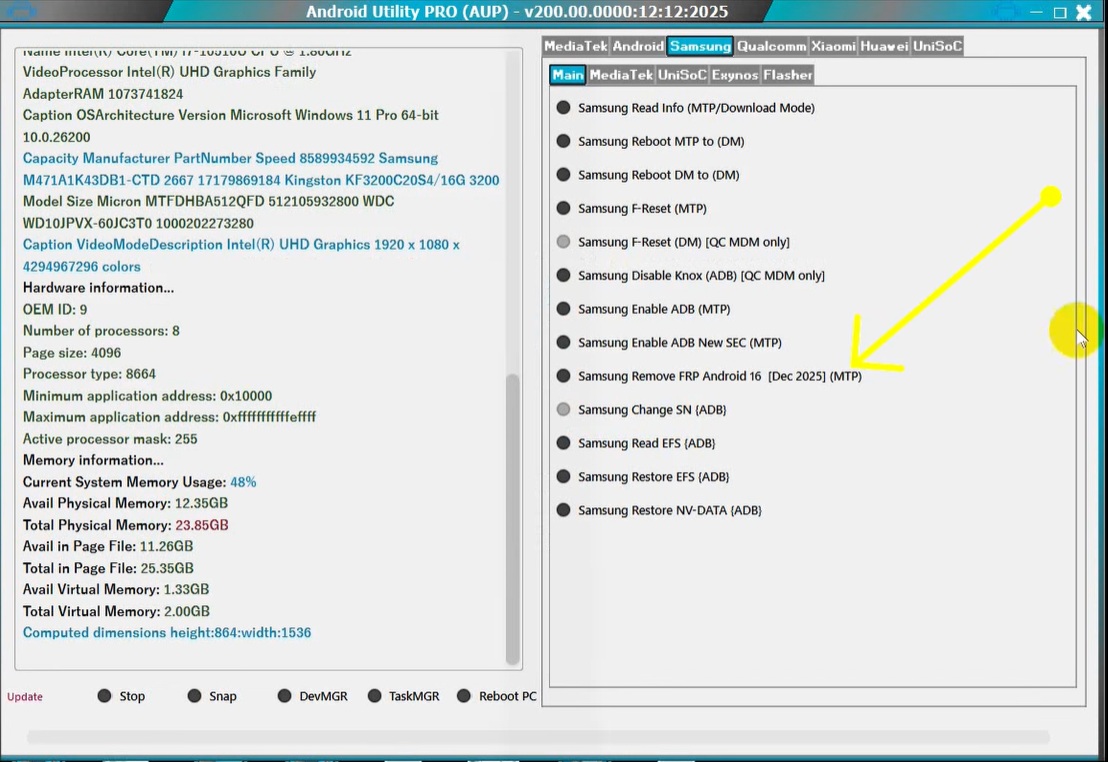
[NEW] Android Utility PRO V200 – Remove FRP Samsung Android 16
[TRENDING] Android Utility PRO V200 – Remove FRP Samsung Android 16
[NEW] Android Utility PRO V200 – Remove FRP Samsung Android 16
[TRENDING] Android Utility PRO V200 – Remove FRP Samsung Android 16
[NEW] Android Utility PRO V200 – Remove FRP Samsung Android 16
[TRENDING] Android Utility PRO V200 – Remove FRP Samsung Android 16
[NEW] Android Utility PRO V200 – Remove FRP Samsung Android 16
[TRENDING] Android Utility PRO V200 – Remove FRP Samsung Android 16
[NEW] Android Utility PRO V200 – Remove FRP Samsung Android 16
[TRENDING] Android Utility PRO V200 – Remove FRP Samsung Android 16
[NEW] Android Utility PRO V200 – Remove FRP Samsung Android 16
[TRENDING] Android Utility PRO V200 – Remove FRP Samsung Android 16
[NEW] Android Utility PRO V200 – Remove FRP Samsung Android 16
[TRENDING] Android Utility PRO V200 – Remove FRP Samsung Android 16
[NEW] Android Utility PRO V200 – Remove FRP Samsung Android 16
[TRENDING] Android Utility PRO V200 – Remove FRP Samsung Android 16
[NEW] Android Utility PRO V200 – Remove FRP Samsung Android 16
[TRENDING] Android Utility PRO V200 – Remove FRP Samsung Android 16
[NEW] Android Utility PRO V200 – Remove FRP Samsung Android 16
[TRENDING] Android Utility PRO V200 – Remove FRP Samsung Android 16
[NEW] Android Utility PRO V200 – Remove FRP Samsung Android 16
[TRENDING] Android Utility PRO V200 – Remove FRP Samsung Android 16
[NEW] Android Utility PRO V200 – Remove FRP Samsung Android 16
[TRENDING] Android Utility PRO V200 – Remove FRP Samsung Android 16
[NEW] Android Utility PRO V200 – Remove FRP Samsung Android 16
[TRENDING] Android Utility PRO V200 – Remove FRP Samsung Android 16
[NEW] Android Utility PRO V200 – Remove FRP Samsung Android 16
[TRENDING] Android Utility PRO V200 – Remove FRP Samsung Android 16
[NEW] Android Utility PRO V200 – Remove FRP Samsung Android 16
[TRENDING] Android Utility PRO V200 – Remove FRP Samsung Android 16
[NEW] Android Utility PRO V200 – Remove FRP Samsung Android 16
[TRENDING] Android Utility PRO V200 – Remove FRP Samsung Android 16
[NEW] Android Utility PRO V200 – Remove FRP Samsung Android 16
[TRENDING] Android Utility PRO V200 – Remove FRP Samsung Android 16
[NEW] Android Utility PRO V200 – Remove FRP Samsung Android 16
[TRENDING] Android Utility PRO V200 – Remove FRP Samsung Android 16
[NEW] Android Utility PRO V200 – Remove FRP Samsung Android 16
[TRENDING] Android Utility PRO V200 – Remove FRP Samsung Android 16
[NEW] Android Utility PRO V200 – Remove FRP Samsung Android 16
[TRENDING] Android Utility PRO V200 – Remove FRP Samsung Android 16

Android Utility PRO V200 – Remove FRP Samsung Android 16

Android Utility PRO V200 – Remove FRP Samsung Android 16 2026

Master the latest 2026 security bypass for Samsung Galaxy devices running Android 16 with the updated Android Utility PRO V200.

Device Information
BRAND: Samsung
MODEL: Android 16 (S25/S26 Series)
||||
CPU: Snapdragon 8 Gen 5 / Exynos 2600
💾
MODE: MTP / WiFi / ADB
⚙️
METHOD: AUP V200 1-Click Dec 2025 Patch
✔️
BY: TSM Team
👑

Technical Specifications

Security Patch: December 2025
Android Version: 16.0 (Upside Down Cake Next)
Supported CPUs: Snapdragon, Exynos, MTK
Unlock Mode: MTP Browser / Test Mode
Tool Version: Android Utility PRO V200

What is FRP Lock?

Factory Reset Protection (FRP) is a security feature in Android devices starting from Version 5.1. When you perform a factory reset, the device asks for the previously synced Google Account credentials. In 2026, Samsung’s Android 16 introduces Knox Matrix 4.0, making manual bypasses nearly impossible without professional tools.

Pro Tip: Always ensure you have a stable WiFi connection before starting the Android Utility PRO bypass process.

Common FRP Triggers:

  • Hard resetting via Recovery Mode.
  • Forgetting the pattern/PIN and resetting.
  • Incomplete setup after a firmware flash.

Step-by-Step Guide: Samsung Android 16 FRP Removal

This method uses the latest MTP exploit found in Android Utility PRO V200.
  1. Step 1: Download the Android Utility PRO Tool from https://www.mfdl.io/
  2. Step 2: Extract the ZIP file. Use password mfdl if prompted.
  3. Step 3: Launch the tool. Navigate to the Samsung Tab and select the Main Option.
  4. Step 4: Click on “Samsung Remove FRP Android 16 [Dec 2025] (MTP)”.
  5. Step 5: Connect your Samsung phone to the PC. Ensure it is on the Welcome Screen with WiFi active.
  6. Step 6: The tool will automatically trigger the exploit and bypass the Google Lock.
Technician Carlos

Carlos Mendes 🇧🇷

Profit: $8.00 per Unlock

“Working in São Paulo, I get many S25 and S26 units with forgotten accounts. Android Utility PRO V200 saved my shop! The 1-click MTP method is incredibly fast. I unlocked a client’s device in 2 minutes and made a quick $8 profit. Best tool for 2026!”

Summary Comparison

Feature Manual Method AUP V200 Tool
Slow (30+ mins) Instant (1 Click)
Risky Firmware Flash Safe MTP Exploit
Android 11-13 Only Full Android 16 Support

Frequently Asked Questions (FAQs)

Does Android Utility PRO V200 work on S26 Ultra?
Yes, V200 is specifically updated to handle the new security layers in the S26 series running Android 16.
What is the ZIP password?
The password for all Android Utility PRO files is mfdl.
Do I need to enable USB Debugging?
No, this specific method works via MTP mode, so you don’t need to access settings or enable ADB manually.
Is this tool free to use?
Android Utility PRO is a community-driven tool often available for free or as part of a specialized repair package.
Will I lose my data?
FRP removal is usually done after a factory reset, so data is already gone. The process itself does not delete further hardware data.

Conclusion

Unlocking Samsung Android 16 devices in 2026 is no longer a headache. With Android Utility PRO V200, technicians can provide fast, reliable, and profitable FRP removal services. Follow the steps carefully and always stay updated with the latest security patches.

Download Android Utility Pro

ZIP Password: mfdl
Disclaimer: This guide is for educational purposes and for use on devices you legally own. Using these tools on stolen property is illegal.

Leave a Comment

📄
138,500+ Total Success Report
⬇️
295K+ Downloads
👨🏻‍💻
204802+ Customers
📱
3875+ Supported Models