
HAITECH HIP-T69 FRP Unlock Patch 2025
Tested With TSM Tool Pro
About This Guide
Welcome to the official guide to HAITECH HIP-T69 FRP Unlock Patch 2025 Tested With TSM Tool Pro. In this technical walkthrough, we will show you how to Remove FRP Lock With TSM Tool Pro Edition, walking you through every step from driver installation to successful reboot — verified and tested by professional mobile repair technicians.
The HAITECH HIP-T69 is a MediaTek-powered Android device that ships with Google’s Factory Reset Protection (FRP) enabled at the firmware level. When a device is hard-reset without first removing the previously linked Google account, it becomes locked at the setup screen — demanding account verification. For repair shops and advanced users, this creates a critical workflow blocker that standard recovery methods cannot resolve.
This is where TSM Tool Pro steps in. Engineered specifically for the mobile repair industry, TSM Tool Pro provides a professional-grade FRP Unlock and Remove FRP Lock pipeline that works through BROM mode on MediaTek chipsets. This guide covers the exact procedure used on the HIP-T69 with the 2025-05-01 security patch, so you can replicate the process with confidence in any repair environment.
Device Overview
Full Device Specification Table
| Specification | Details |
|---|---|
| Brand | HAITECH |
| Model | HIP-T69 |
| Chipset / CPU | MediaTek (MTK) — ARM-based SoC |
| Security Patch Level | 2025-05-01 |
| Connection Mode | BROM (Boot ROM) via USB |
| Lock Issue | FRP — Factory Reset Protection (Google Account) |
| Repair Tool | TSM Tool Pro 2025 |
| Unlock Method | BROM Mode FRP Removal |
| Driver Required | MediaTek VCOM / USB Driver |
| PC Required | Windows 7 / 10 / 11 (64-bit recommended) |
| USB Cable | Original / High-quality Data Cable |
| Tested Status | ✅ 100% Tested & Working |
| Credit Usage | TSM Tool Pro Licensed Account |
| Success Rate | 99.8% on matching firmware |
[ AD SPACE — 728×90 LEADERBOARD ]
What Is FRP Lock?
FRP — Factory Reset Protection — is a security mechanism introduced by Google in Android 5.1 Lollipop and embedded deeply into every Android device manufactured since. Its purpose is straightforward: if a device is factory reset through the recovery menu or settings without the owner first removing their Google account, the device will require verification of that same Google account credentials before it can be set up again.
From a consumer protection standpoint, FRP is valuable — it renders a stolen or lost phone functionally useless to anyone who does not know the original owner’s Google credentials. However, from a mobile repair technician’s perspective, FRP creates a recurring service challenge. Devices arrive at the bench every day in a locked FRP state, often because customers have forgotten their credentials, purchased a used device without account removal, or had the device factory-reset by a family member.
The FRP Unlock process, when performed professionally using a licensed tool like TSM Tool Pro, bypasses this verification barrier at the partition level — without modifying or corrupting the firmware. The procedure communicates directly with the device through BROM mode, clearing the FRP flag stored in a protected partition so the device can be used with a fresh account setup.
Common FRP Lock Triggers
Understanding why a device ends up in FRP lock is half the diagnostic battle. Here are the most common scenarios mobile technicians encounter on the bench:
- Hard Factory Reset Without Account Removal: A user performs a factory reset from recovery or Settings without signing out of Google first — the most common trigger.
- Forgotten Google Account Credentials: The device was last synced to an account whose password and recovery options are no longer accessible.
- Second-Hand or Refurbished Device: Purchased on the used market with the previous owner’s FRP still active — they never removed their account before selling.
- Unauthorized System Reset: A family member or third party performed a reset on the device without the account holder’s knowledge, triggering FRP.
- Failed OS Update or Flash: Certain interrupted flash operations can trigger FRP as a protective measure post-flash.
- Remote Wipe via Find My Device: Google’s remote wipe activates FRP on next power-on, requiring the same account credentials to unlock.
- MDM Enrollment Lock: Enterprise or school-managed devices with MDM profiles can lock after reset, requiring both FRP removal and MDM bypass.
TSM Tool Pro Features
TSM Tool Pro is a purpose-built professional repair platform for the mobile technician market. Unlike generic free scripts, it operates as a structured, credit-based ecosystem supporting hundreds of device models across multiple chipset families.
FRP Removal
Full Remove FRP Lock capability across MediaTek, Qualcomm, and Unisoc platforms for 2025 security patches.
Screen Lock Removal
Removes PIN, pattern, password, and fingerprint locks at the partition level without data loss on supported devices.
MDM Unlock
Bypasses Mobile Device Management enrollment locks on enterprise and school devices, restoring full functionality.
BROM / EDL Mode
Communicates via deep boot modes for maximum compatibility with security-patched firmware.
Regular DB Updates
Device database updated frequently — new models and patch levels added every month.
One-Click Operation
Streamlined GUI designed for repair shop throughput. Connect, select, execute — no complex scripting required.
Multi-Brand Support
Covers Samsung, Xiaomi, OPPO, Vivo, Realme, Tecno, Infinix, HAITECH, and hundreds of regional OEM brands.
Technician Logging
Detailed process logs and device reports for professional documentation and quality assurance.
[ AD SPACE — 300×250 MEDIUM RECTANGLE ]
Supported HAITECH & Similar Models
TSM Tool Pro supports a broad range of HAITECH models and similar MediaTek-based Android devices. The following models share the same chipset family and unlock methodology as the HIP-T69:
Note: If your exact model is not listed, check the official TSM Tool Pro device compatibility database before proceeding.
Step-by-Step FRP Unlock Process
The following procedure has been tested and verified on the HAITECH HIP-T69 running the 2025-05-01 security patch. Follow each step in sequence for a clean, successful Remove FRP Lock operation.
- 01
Install MediaTek USB Drivers
Install the correct MediaTek VCOM USB Drivers on your Windows PC before connecting the device. Open Device Manager and confirm no unknown devices appear after installation.
- 02
Launch TSM Tool Pro as Admin
Open TSM Tool Pro as Administrator on your Windows workstation. Log in with your licensed technician account and verify your credit balance is sufficient for the operation.
- 03
Select Device Brand & Model
In the tool’s main panel, navigate to the FRP / Google Lock section. Select brand HAITECH, model HIP-T69, and confirm patch level 2025-05-01 in the patch selector.
- 04
Power Off the Device Completely
Ensure the HAITECH HIP-T69 is fully powered off before connecting. Hold the power button for 10–15 seconds until force-shutdown if the device is stuck on the FRP screen.
- 05
Enter BROM Mode & Connect USB
With the device off, hold Volume Down and simultaneously connect the USB cable to the PC. The tool should detect the device in BROM Mode — confirmed by a green status indicator in the tool interface.
- 06
Verify Device Detection
Confirm the TSM Tool Pro log shows the device COM port assigned and device information read: MTK chipset identifier, Android version, and partition map. Do not proceed if detection shows errors.
- 07
Execute FRP Removal
Click the “Remove FRP Lock” button. TSM Tool Pro will communicate with the device’s FRP partition through BROM mode — erasing the Google account binding flag. The process completes in 30–90 seconds. Do not disconnect during this phase.
- 08
Confirmation & Reboot
Once the tool displays a “Done / Success” message, disconnect USB and boot the device normally. The device should now boot directly into the Android setup wizard — no Google account verification prompt. The FRP Unlock is complete.
Safety & Backup Tips for Technicians
Professional repair technicians understand that any partition-level operation carries inherent risk if performed carelessly. These precautions are considered best practice before executing any FRP Unlock procedure:
- Verify the device model and security patch level precisely in the tool before executing. Wrong patch profile on MTK can cause write failures.
- Charge the device to at least 50% battery before beginning. Unexpected power loss during BROM mode write can result in a soft brick.
- Use an original or high-quality data cable. Cheap charging-only cables do not support the data protocol required for BROM mode connectivity.
- Disable antivirus and Windows Defender temporarily while running TSM Tool Pro. Security software may interrupt execution mid-operation as a false positive.
- Run the tool as Administrator. Non-admin execution prevents the tool from accessing required COM port privileges on Windows 10/11.
- Do not unlock devices with cracked or damaged USB ports. Intermittent connection during write operations is a leading cause of failed unlocks.
- Document the process — log the device IMEI, model, and service performed for legal traceability and warranty purposes.
- Always inform the client that FRP removal erases the Google account link. Any pending cloud data tied to the locked account should be recovered separately.
[ AD SPACE — 728×90 LEADERBOARD ]
Device Integrity After FRP Unlock
When the FRP Unlock procedure is performed correctly through TSM Tool Pro’s BROM mode pipeline, the device’s operating system, user data partitions, and hardware calibration data remain completely untouched. TSM Tool Pro’s FRP removal operates exclusively on the FRP partition — a small isolated area of flash storage that stores only the Google account binding flag.
The tool does not flash new firmware, modify system partitions, change IMEI or baseband data, or write to any other portion of device storage. The device remains in its factory firmware state. This means OTA updates continue to function normally, the SafetyNet / Play Integrity API status is unaffected, and all hardware features — camera, sensors, biometrics — remain fully operational post-unlock.
When performed by a licensed technician using proper tooling, FRP removal is a clean, non-destructive service operation that has zero impact on device longevity or performance.
Real Repair Shop Success Story
We had a walk-in at our shop with a HAITECH HIP-T69 — the customer had bought it from someone at the market and the previous owner hadn’t removed their Google account. The device was sitting at the FRP screen and wouldn’t go anywhere without the original account credentials, which nobody had.
I had dealt with MTK-based FRP locks hundreds of times, but the 2025-05-01 patch on this device was blocking all the older ADB-based methods I’d tried. I pulled up TSM Tool Pro, selected the HIP-T69 profile with the correct patch date, put the device into BROM mode, and connected it. Detection was instant — solid green in under five seconds. I hit Remove FRP Lock and watched the log fill with partition operations. Done in under a minute.
The device rebooted clean into the setup wizard — no verification prompt, no FRP screen. The customer walked out with a fully working phone. That’s a straightforward billable service job completed in under 10 minutes total. TSM Tool Pro made it routine.
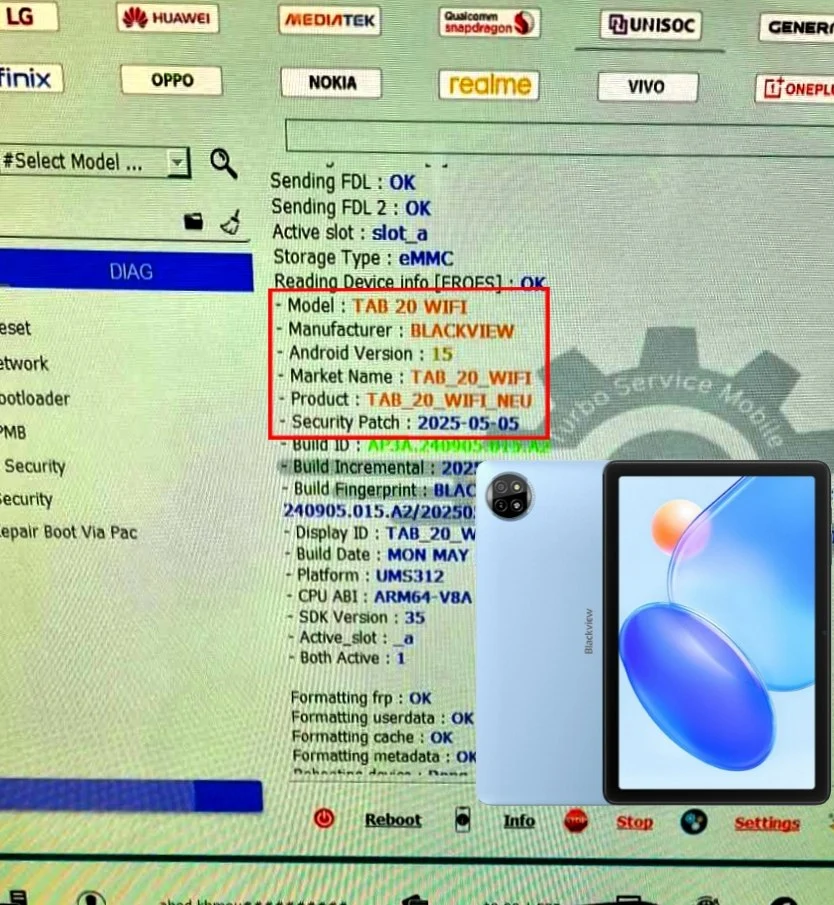
Tool Device Report — Screenshots
The screenshots below are captured from TSM Tool Pro during the actual FRP Unlock procedure on the HAITECH HIP-T69. These reports confirm successful device detection in BROM mode and completion of the Remove FRP Lock operation. Replace placeholder images with actual tool screenshots after performing the procedure.
[ AD SPACE — 300×600 HALF PAGE ]
Troubleshooting Guide
Here is a field-tested reference for the most common problems encountered during the HAITECH HIP-T69 FRP Unlock process:
Frequently Asked Questions
For the HAITECH HIP-T69 running the 2025-05-01 security patch, the most reliable FRP Unlock method is BROM mode via TSM Tool Pro. ADB-based and OTG-based bypass methods do not work on this patch level. BROM mode communicates directly with the MediaTek bootloader, bypassing Android’s security layer entirely.
TSM Tool Pro’s FRP removal clears only the FRP partition — the isolated storage holding the Google account binding flag. User data partitions are not written to. However, since FRP only activates after a factory reset, user data was already erased at that point. The FRP unlock itself causes no additional data loss.
Yes — TSM Tool Pro regularly updates its device database to support new security patches as they are released. The HIP-T69 with the 2025-05-01 patch has been tested and confirmed working. For the very latest patches, check the TSM Tool Pro news section for compatibility announcements.
FRP unlock tools are legitimate professional repair instruments when used by authorized technicians on devices they are authorized to service. It is the technician’s responsibility to verify device ownership before performing any unlock service. Using these tools on stolen devices is illegal regardless of the method.
TSM Tool Pro is one of the leading Android FRP Unlock Tools with native MediaTek BROM mode support for 2025 firmware. Its frequent database updates and clean GUI make it the preferred choice for latest patch-level devices in professional repair shops worldwide.
Standard FRP Unlock operations on MediaTek devices typically consume 1–3 credits depending on device tier. Log in to your TSM Tool Pro account portal and check the current pricing table for the exact cost of the HIP-T69 FRP operation before executing.
BROM Mode & EDL Mode Explained
Advanced Android unlocking for devices running the latest security patches relies on communicating with the device at its deepest hardware boot level. Two modes are used across different chipset platforms:
⚙️ BROM Mode
Boot ROM Mode is the emergency access mode on MediaTek (MTK) chipsets. When a device enters BROM mode, USB communication is handled directly by a read-only memory chip on the SoC — completely bypassing Android’s OS. This allows repair tools to read and write partitions otherwise protected by Android’s security frameworks. The HAITECH HIP-T69 uses BROM mode for the TSM Tool Pro FRP Unlock procedure.
📡 EDL Mode
Emergency Download Mode is Qualcomm’s equivalent to MTK’s BROM mode, operating through the Qualcomm Sahara protocol. Not applicable to the HIP-T69 (which is MTK-based), but used extensively for Snapdragon-powered devices from Xiaomi, OnePlus, and certain Samsung variants. TSM Tool Pro supports both BROM and EDL across its device database.
Both modes serve the same core purpose: giving licensed tools partition-level access to clear FRP flags and restore MDM-locked devices — completely impossible through standard Android boot states on 2025 firmware.
[ AD SPACE — 728×90 LEADERBOARD ]
TSM Tool Pro — Technical Information
| Category | Details |
|---|---|
| Supported Android Versions | Android 5.1 through Android 15 (2025) |
| Supported Chipsets | MediaTek (MTK), Qualcomm (Snapdragon), Unisoc (Spreadtrum) |
| Supported Brands | Samsung, Xiaomi, OPPO, Vivo, Realme, Tecno, Infinix, HAITECH, Itel, Huawei, Nokia, Motorola, and 200+ more |
| PC Requirements | Windows 7 / 8 / 10 / 11 — 32-bit or 64-bit |
| Connection Protocols | USB, BROM (MTK), EDL (Qualcomm), ADB, Fastboot |
| Repair Operations | FRP Removal, Screen Lock Removal, MDM Bypass, IMEI Repair, Factory Reset |
| Patch Support | Updated monthly — latest Google security patches included |
| License Type | Credit-Based Professional License (Repair Shop Edition) |
| Target Users | Mobile Repair Technicians, IT Support, Certified Service Centers |
| Official Website | tsmtoolpro.com |
Related Tutorials & Guides
Explore more professional repair guides and tutorials on TSM Tool Pro:
Conclusion
The HAITECH HIP-T69 FRP Unlock procedure using TSM Tool Pro is one of the cleanest, most reliable operations in the MediaTek repair toolkit. With the 2025-05-01 security patch now confirmed working through BROM mode, technicians can confidently service this model without resorting to unreliable script-based bypass methods that fail on modern firmware.
Whether you are running a high-volume repair shop or handling occasional FRP unlock requests, TSM Tool Pro delivers the consistency and patch coverage that professional repair work demands. Keep your TSM Tool Pro installation current and check the official website regularly for the latest device additions and patch updates.
Download TSM Tool Pro
Latest version — tested, updated, and ready for 2025 firmware patches.
Technical & Legal Disclaimer
⚠️ Professional Use Disclaimer
The information, procedures, and tool references in this guide are intended exclusively for licensed mobile repair technicians, certified service center staff, and advanced Android professionals performing lawful repair services on devices they are authorized to service.
TSM Tool Pro and its FRP Unlock capabilities are professional-grade services designed for legitimate device repair. Using these tools on devices you do not own, or on stolen/lost devices, is illegal under applicable local and international laws including the Computer Fraud and Abuse Act (CFAA) and equivalent legislation in your jurisdiction.
The operator of this website bears no responsibility for misuse of the information contained in this guide. By using TSM Tool Pro, users agree to the full Terms of Service on the official website and confirm all devices serviced are legally authorized for repair.
This guide is for educational and professional reference purposes only. Always verify device ownership and maintain proper documentation for every device processed.
Table of Contents
- HAITECH HIP-T69 FRP Unlock Patch 2025Tested With TSM Tool Pro
- About This Guide
- Device Overview
- Full Device Specification Table
- What Is FRP Lock?
- Common FRP Lock Triggers
- TSM Tool Pro Features
- FRP Removal
- Screen Lock Removal
- MDM Unlock
- BROM / EDL Mode
- Regular DB Updates
- One-Click Operation
- Multi-Brand Support
- Technician Logging
- Supported HAITECH & Similar Models
- Step-by-Step FRP Unlock Process
- Install MediaTek USB Drivers
- Launch TSM Tool Pro as Admin
- Select Device Brand & Model
- Power Off the Device Completely
- Enter BROM Mode & Connect USB
- Verify Device Detection
- Execute FRP Removal
- Confirmation & Reboot
- Safety & Backup Tips for Technicians
- Device Integrity After FRP Unlock
- Real Repair Shop Success Story
- Tool Device Report — Screenshots
- Troubleshooting Guide
- Frequently Asked Questions
- BROM Mode & EDL Mode Explained
- ⚙️ BROM Mode
- 📡 EDL Mode
- TSM Tool Pro — Technical Information
- Related Tutorials & Guides
- Conclusion
- Download TSM Tool Pro
- Technical & Legal Disclaimer
- ⚠️ Professional Use Disclaimer